Volume Tiering
SeaweedFS Enterprise places every write on the storage it deserves and keeps moving it as it cools. A volume class routes each object by its path — table-format metadata to fast replicated SSD, bulk data to capacity disks — and a tiering profile ages each class down a ladder: replicated → erasure-coded → cloud. The rules for Iceberg, Delta, and Hudi layouts are built in, so a lakehouse workload usually needs only two profiles and two bindings.
Disk types are the tiers
A tier is just a tag on a volume server. Start servers with -disk=ssd, -disk=hdd, or any label you like (nvme, hdd_bulk, …), one per data directory:
weed volume -dir=/fast -disk=ssd  -mserver=:9333 ...
weed volume -dir=/d1,/d2,/d3 -disk=hdd,hdd,hdd -mserver=:9333 ...
A volume’s identity includes its disk type (and its class), so tiers never share storage: the master places and grows volumes per type.
Volume classes route each write
Selector rules map object paths to a class with glob patterns, first match wins. The table-format conventions ship built in — configure nothing and these already resolve:
| Class | Built-in patterns |
|---|---|
meta |
**/metadata/**, **/_delta_log/**, **/.hoodie/**, **/*.metadata.json, **/version-hint.text, **/*.avro |
data |
**/*.parquet, **/*.orc |
The ordering is deliberate: a Delta checkpoint is a .parquet file under _delta_log/ and correctly classifies as meta — the trap a hand-written *.parquet → data rule falls into. Your own selectors go above the built-ins and win. Built-in rules stay inert until a binding uses their class, so an upgraded cluster that configures nothing places exactly as before.
Classification happens on the write path, server-side: an S3 PUT and a filer write to the same key classify identically, with no client changes.
Profiles: the ladder
A profile declares where a class’s volumes are born (the landing: disk type + replication) and the tiers they descend into as they go quiet. The whole policy is one document applied with tiering.apply:
{
  "tailClass": "meta",
  "profiles": [
    { "name": "hot-meta",
      "landing": { "diskType": "ssd", "replication": "001" } },
    { "name": "cold-data",
      "landing": { "diskType": "hdd", "replication": "001" },
      "tiers": [
        { "name": "ec", "when": { "quietForSeconds": 604800 },
          "ec": { "diskType": "hdd", "dataShards": 10, "parityShards": 4 } },
        { "name": "archive", "when": { "quietForSeconds": 7776000 },
          "remote": { "backend": "s3.archive" } }
      ] }
  ],
  "bindings": [
    { "collectionPattern": "*", "volumeClass": "meta", "profileName": "hot-meta" },
    { "collectionPattern": "*", "volumeClass": "data", "profileName": "cold-data" }
  ]
}
Each tier is one of three forms: replicated (another disk type + replication code), ec (erasure-coded, e.g. 10+4 ≈ 1.4× storage for the durability of 3× replication), or remote (a cloud backend from master.toml). Triggers combine quiet time, fullness, and minimum size. Volumes only descend; the volume_tiering plugin worker performs the transitions in the background. The guidance for metadata is baked into the model: raise its replication, never erasure-code or off-load it — data takes the full ladder.
A fast tier that cannot overflow
Per-medium pressure rules demote the coldest volumes off a filling disk type ahead of their age triggers, between a high and a low watermark. A small NVMe/SSD tier drains itself instead of filling up — capacity relief, while the age ladder still governs everything else.
Parquet footers stay fast
One leak in a metadata/data split: a .parquet file is data, so its footer — read on every query’s critical path, before any data page — would age onto cold storage with the body. The tailClass setting and the Cache Parquet Footers job close it: the job follows the filer’s metadata stream, and for each new Parquet file caches the footer plus page index into the tail class on fast media, recorded on the entry separately from the body chunks. The cached extent is floored at 64 KiB of tail because that is the speculative read most engines open with (Arrow’s default) — the opening read is served entirely from the fast tier, and only the row groups a query actually touches come off cold storage. The body still erasure-codes and off-loads on schedule.
Configure from the Admin UI
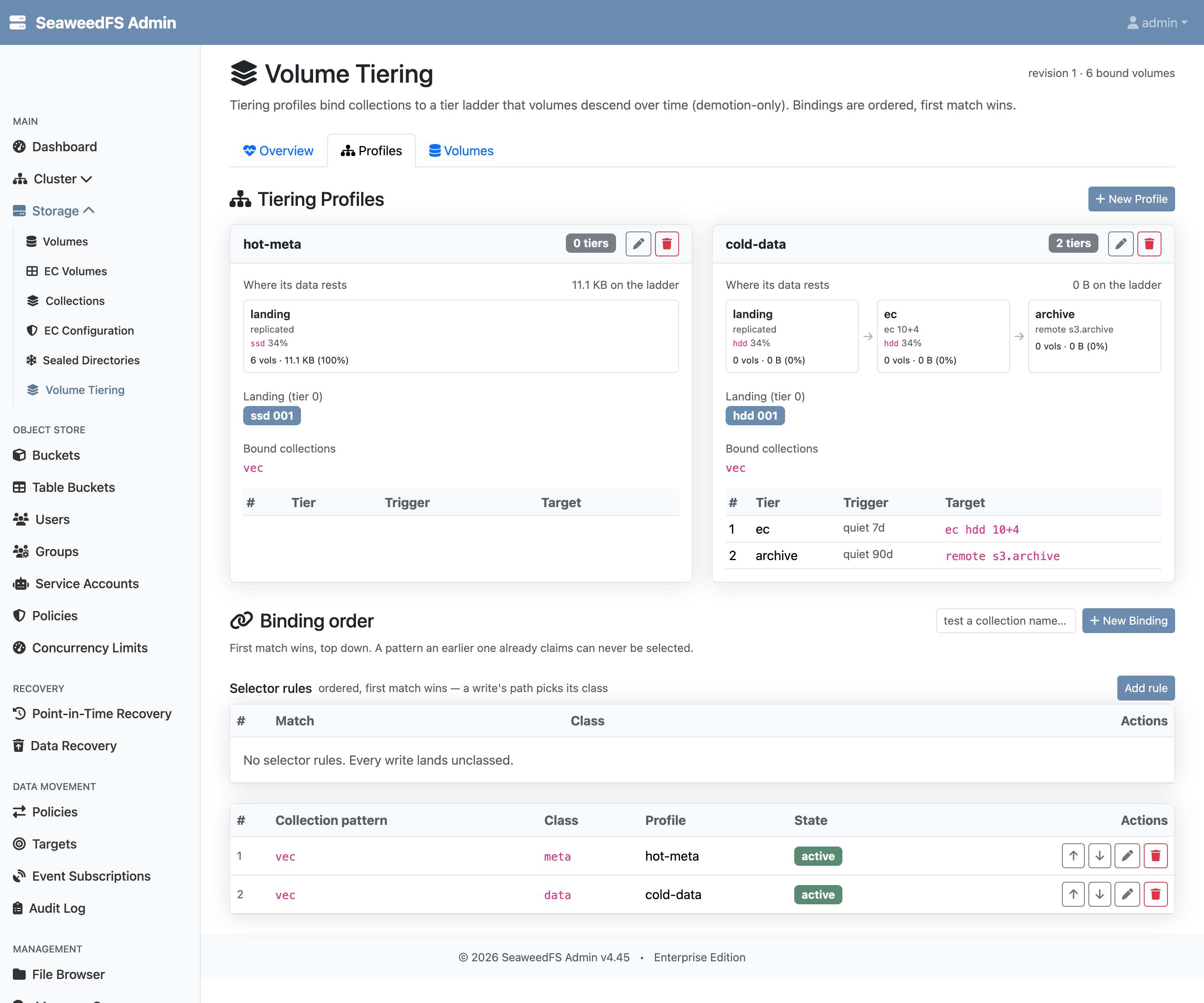
Everything in the document above can be managed interactively under Storage → Volume Tiering. The Profiles tab shows each profile as a card — where its data currently rests on the ladder, the landing placement, and the rung table — with the binding order below it and a probe box to test which profile a collection name resolves to:
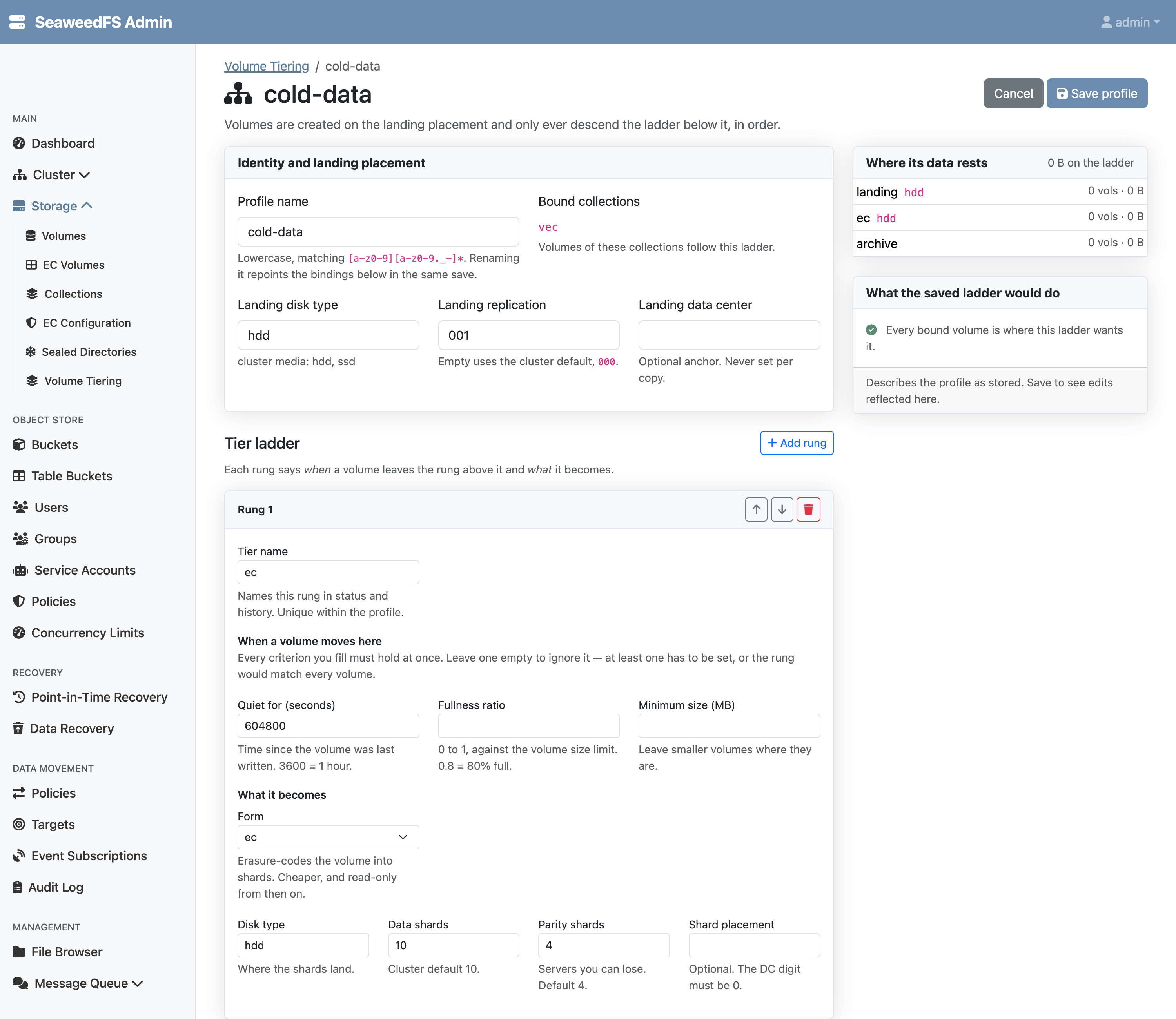
Editing a profile opens a full editor — identity and landing placement, one card per rung with its triggers and target form, and a live verdict of what the saved ladder would do to the volumes currently bound to it:
Operating it
weed shell
> tiering.apply -file=tiering.json     # validate + apply the document
> tiering.bind -collection=vec -class=data -profile=cold-data
> tiering.status -v                    # classify volumes against their ladders
> tiering.run                          # execute pending moves now
The volume_tiering and tail_cache jobs run on plugin workers (weed worker -admin=...); enable them per job type from the Admin UI. Transitions use the same primitives as the manual commands (ec.encode, volume.tier.move, volume.tier.upload), so everything the worker does you can also do by hand.
Notes
- Volume tiering, volume classes, and the Parquet footer cache are SeaweedFS Enterprise features. The manual primitives (disk types,
ec.encode,volume.tier.move) are open source. - A class is a placement preference: if no volume of the class exists and none can be created, the write still succeeds on ordinary volumes — slower reads, never failures.
- The footer cache picks up files written from the moment it is enabled; pre-existing files are a backfill.
See it run end to end — a table bucket with metadata pinned to SSD, data aged into erasure coding, and a cached footer verified on the fast tier — in the walkthrough blog post. For the configuration document, Admin UI, trigger semantics, and the footer cache’s exact behavior, see the technical reference.
Related: Erasure Coding · S3 Table Buckets · Sealed Directories · Data Movement