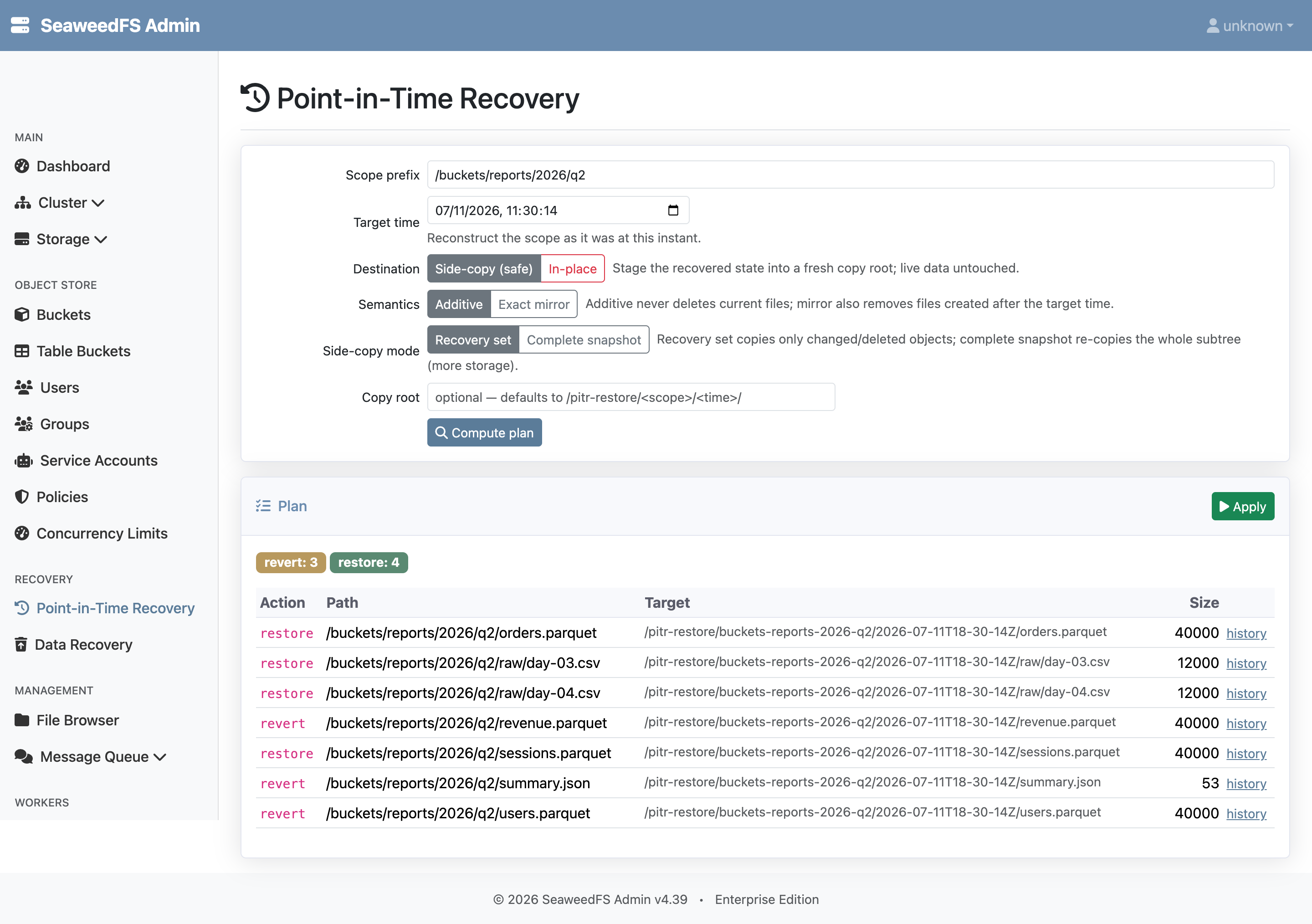
Point-in-Time Recovery
SeaweedFS Enterprise Point-in-Time Recovery (PITR) reconstructs what a path prefix — or a single object — looked like at a chosen moment in the past, within the same retention window that powers Data Recovery. Where Data Recovery answers “show me what was deleted and bring it back,” PITR answers “make this folder look the way it did at 14:00.” It reverts overwrites, restores deletes, and (when asked) removes files created after the target time, reconciling a whole subtree to a single instant in one operation.
Most data-loss incidents are not clean deletes. A bad ETL run rewrites thousands of objects with corrupt output. A buggy migration overwrites a dataset in place. An AI agent edits files it should have left alone. A sync tool flips a directory to the wrong state. In every one of these the files still exist — they just hold the wrong bytes — so a delete-oriented tool cannot see the damage. PITR closes that gap: it works from the filer’s metadata change log, so it sees overwrites and renames as well as deletes, and it can roll an entire scope back to a known-good point in time.
PITR is a time-centric companion to Data Recovery, and the two share the same engine. Data Recovery is the fast path for “undo my delete” — browse what is missing and grab it back. PITR is the path for “the 14:00 job corrupted everything under /warehouse” — pick a time, pick a scope, and reconcile it. Both run on the same -deletionRetention window and the same retained-bytes recovery, so enabling one enables the other.
Why It Matters
A point-in-time view turns a sprawling investigation into a single decision. Instead of hunting through backups to find which objects a bad job touched, an operator picks the time just before the incident, scopes it to the affected prefix, and reviews a plan of exactly what would change. Nothing is touched until that plan is approved, and the safe default never overwrites live data at all.
Use Point-in-Time Recovery when:
- A job or migration corrupts data in place: An ETL run, batch transform, or schema migration overwrites objects with bad output. The files still exist, so a delete-recovery tool sees nothing — PITR reverts them to their pre-job content.
- An AI agent rewrites the wrong files: Autonomous edits land across many paths at once. Roll the affected subtree back to the moment before the agent ran, without disturbing unrelated work.
- A bad sync or rename leaves a tree in the wrong state: Reconstruct the prefix as it was, including files that were renamed away.
- You need a specific object’s earlier version: Open one file’s full history in the retention window and restore any past version, not only the most recent deletion.
- An incident needs a reviewable rollback: Compute a plan, see the exact counts and per-path changes, stage them to a safe copy for verification, and only then apply in place.
What Can It Do?
- Reconstruct a prefix at a target time: Recover everything under a folder or S3 key prefix (including a whole bucket via its root) to the state it had at a chosen instant.
- Time-travel a single file: View an object’s full version history within the retention window and restore any past version.
- Choose a safe destination: Side-copy (the default) stages the recovered state into a fresh location and never touches live data; in-place rewrites the original paths after a typed confirmation.
- Choose the reconciliation semantics: Additive (the default) only restores what was lost or changed and never deletes a current file; exact mirror also removes files created after the target time so the scope matches that instant exactly.
- Preview before applying: Every action computes a dry-run plan first — counts and per-path actions — and applies only on a separate, confirmed call.
- Recover overwrites, deletes, and renames: The plan distinguishes revert (content changed), metadata-only revert, restore (gone now), replace, and remove-created-after, per path.
How Does It Work?
1. Delayed Garbage Collection (Retention)
PITR uses the same retention window as Data Recovery. When -deletionRetention is non-zero, the master preserves tombstoned bytes through vacuum — and crucially, an overwrite tombstones the old chunks the same way a delete does, so prior versions stay readable for the window. Enable it on the master:
weed master -deletionRetention=72h
# or, when running the combined server:
weed server -master.deletionRetention=72h
Notes:
- The default is
0, which disables both Data Recovery and PITR. - The value must be non-negative and is not hot-reloadable — restart the master to change it.
- The auto-installed default 25 TB trial license caps the window at 1 hour; install a full license to use longer windows.
2. Reconstructing the State at a Time
The Admin server replays the filer’s metadata change log over the window from the target time to now, scoped to the chosen prefix. For each path, the earliest change after the target time records what that path looked like at the target time. The result is diffed against the current live state to produce a per-path plan:
- Revert — the file exists now with different content; rewrite it to its target-time bytes.
- Revert metadata — same content, but permissions, tags, or other attributes changed; reapply the target-time metadata only.
- Restore — the file existed at the target time but is gone now (deleted or renamed away); recreate it.
- Replace — the path changed type (file became a directory or vice-versa); recreate the target-time form.
- Remove created-after — the file did not exist at the target time but exists now; in exact-mirror mode, remove it.
The walk is stateless and reads a fresh window each time, so the Admin server keeps no separate recovery catalog.
Recoverability guarantee. If the target time is inside the retention window, every version that was current at that time is recoverable: anything that superseded it did so after the target time, which keeps its bytes inside the window. The guarantee holds for a target strictly inside the window; very close to its far edge, an in-flight vacuum can age a version out, which is reported per-path rather than failing silently.
3. Plan, Confirm, Apply
A plan is read-only and safe to run repeatedly. Applying it re-derives the plan against current live state, so it never acts on a stale preview. For an in-place apply, the operator confirms a token that echoes the scope and time, and the apply is bound to a digest of exactly the destructive changes that were previewed — if anything drifted since the preview, the apply is refused and the operator re-previews. Side-copy never touches live data and needs no confirmation; the staged copy can simply be deleted to undo it.
Restore reuses the same retained-bytes path as Data Recovery: it rereads the target-time chunks (including data still marked deleted), uploads fresh copies, and writes them to the destination, preserving inline data, chunk manifests, and server-side encryption metadata.
Using It from the Admin UI
- Enable retention on the master (above) and open the Admin UI.
- Go to Recovery → Point-in-Time Recovery (
/object-store/pitr). - Enter a scope prefix and a target time, choose the destination (side-copy or in-place) and semantics (additive or exact mirror), and click Compute plan.
- Review the counts and per-path table, then click Apply; an in-place apply prompts for a typed confirmation.
- To work with one object, open its history from a plan row or at
/object-store/pitr/file?path=...and restore any listed version.
The same operations are available over HTTP for automation:
| Endpoint | Method | Purpose |
|---|---|---|
/api/pitr/settings |
GET | Whether PITR is enabled, and the retention window |
/api/pitr/plan |
GET | Compute a dry-run plan for a scope + target time |
/api/pitr/file |
GET | A single file’s version timeline |
/api/pitr/apply |
POST | Apply a plan (in-place requires a confirm token + digest) |
/api/pitr/file/restore |
POST | Restore one historical version of a file |
Destinations and Semantics
The two choices combine into four behaviors. The safe defaults are side-copy and additive.
| Additive (default) | Exact mirror | |
|---|---|---|
| Side-copy (default) | Stage the target-time version of every changed or deleted object into a fresh copy root; live data untouched. A complete-snapshot sub-mode re-materializes the whole subtree as a self-contained copy. | Same staged copy — a copy never deletes. |
| In-place | Revert content and metadata and restore deletes at the original paths; files created after the target time are kept. | Additive’s actions plus removing files created after the target time, making the scope match that instant exactly. Highest blast radius; strongest confirmation. |
Why Do Customers Need It?
- Recover from corruption, not just deletion: Roll back in-place overwrites from bad jobs, migrations, and agent edits that delete-recovery tools cannot see.
- Reviewable, low-risk rollback: Preview the exact per-path changes, stage them to a safe copy, and apply in place only after a typed confirmation bound to what was previewed.
- Whole-subtree consistency: Reconcile an entire prefix to one instant in a single operation, instead of restoring objects one at a time.
- Per-object time travel: Restore any past version of a single file from its history in the window.
- No new infrastructure: PITR reuses the retention window, metadata log, and restore engine that Data Recovery already provides — nothing extra to deploy.
Requirements & Limits
- Requires a valid SeaweedFS Enterprise license and
-deletionRetentiongreater than0— the same prerequisite as Data Recovery. - Only target times inside the retention window are recoverable; older state ages out of the log and its bytes are vacuumed away.
- Scopes are a path prefix / subtree or a single file. Whole-namespace (
/) recovery is intentionally not exposed in the UI — the blast radius is too large for a single action. - Versioned S3 buckets are not supported in this release. A scope that intersects a versioned (or version-suspended) bucket is rejected, because versioned objects keep their history under
.versions/and need version-pointer handling rather than byte recovery. - In-place apply is best-effort, not atomic, and does not fence concurrent writers. The dry-run preview, the side-copy default, the re-derive-at-apply check, and per-path results make this safe to operate; for an exact, untouched-live point-in-time artifact, use side-copy complete-snapshot.
- The complete-snapshot side-copy re-copies unchanged files and so duplicates the scope’s storage; the Admin UI reports the size before you run it.
- Objects with a TTL may not be recoverable. TTL expiry runs independently of the retention window, so a TTL object’s bytes can be reclaimed even inside the recovery window.
- PITR complements backups and disaster recovery. Keep independent backups for storage failure, cluster loss, regulatory retention, and recovery beyond the retention window.
Note: If your enterprise license expires, SeaweedFS falls back to open source behavior and Point-in-Time Recovery is disabled, exactly like Data Recovery. Data already retained on disk remains until the normal vacuum reclaims it.