Per-Tenant S3 Concurrency Limiting (QoS)

SeaweedFS Enterprise adds per-tenant concurrent-request limiting to the S3 gateway, so one caller cannot monopolize the gateway and starve everyone else. Operators set caps on how many requests — and how many in-flight bytes — may be in progress at once, keyed by access key, account/tenant, bucket, and a global ceiling. Over a cap, the gateway fails fast with HTTP 503, the status S3 SDKs already back off and retry on.

This is the noisy-neighbor protection that multi-tenant operators ask for first. It is configured and hot-reloaded exactly like the existing circuit breaker, adds no new infrastructure dependency, and is managed from both the weed shell and the admin UI. When the limiter is off, the gateway behaves exactly like OSS SeaweedFS — zero impact on deployments that don’t opt in.

What It Does

  • Four scopes — global, per-bucket, per-account/tenant, and per-access-key — each independently configurable
  • Two dimensions per scope — a cap on concurrent requests and a cap on summed in-flight bytes
  • Per-class limits — separate caps for Read, Write, and List traffic, each an independent counter
  • Cluster-wide caps — a configured cap is divided automatically across the live S3 gateways, so the limit holds for the whole cluster, not per instance
  • Fail-fast — rejected requests return 503 immediately; no queuing, no head-of-line blocking
  • Hot reload — changes take effect across all gateways within seconds, no restart
  • Two management surfaces — the s3.concurrency shell command and an admin UI page, writing the same config
  • Admin never throttled — the built-in admin account always bypasses every cap

Why Customers Use It

  • Noisy-neighbor protection: A single runaway client — a misbehaving batch job, a retry storm, a hot key — can no longer consume all of the gateway’s capacity and degrade every other tenant.
  • Per-tenant QoS: Give each tenant, bucket, or key its own slice of concurrency. Cap the nightly batch key low, leave interactive tenants high.
  • Throughput protection, not just request count: The in-flight-bytes dimension caps the volume of simultaneous uploads, so a few large multipart writes can’t saturate memory or backend bandwidth even when the request count is small.
  • Cluster-correct limits: Because caps divide across live instances, “200 concurrent writes for tenant X” means 200 for the cluster — it doesn’t silently become 200 × number-of-gateways.
  • Drop-in: Reuses the standard S3 503 back-off contract, so existing SDKs and clients handle rejections without code changes.

How It Works

Every data-path S3 request is admitted through the limiter before its handler runs. The limiter classifies the request (Read / Write / List), resolves the identity in play (access key → account → bucket → global), and for each enabled scope tries to take one slot in the concurrent-request counter and, for sized requests, ContentLength worth of the in-flight-bytes counter. Acquisition is all-or-nothing: if any applicable scope is full, slots already taken in other scopes are rolled back and the request is rejected. When the request finishes, every slot it held is released.

                         S3 request (GET / PUT / LIST ...)
                                       │
                                       ▼
                         ┌───────────────────────────┐
                         │  Classify: Read/Write/List│
                         │  Resolve identity         │
                         └─────────────┬─────────────┘
                                       │
            ┌─────────────┬────────────┼──────────────┐
            │             │            │              │
            ▼             ▼            ▼              ▼
      ┌───────────┐ ┌───────────┐ ┌──────────┐ ┌──────────────┐
      │  Global   │ │  Bucket   │ │ Account  │ │  Access key  │
      │  scope    │ │  scope    │ │  scope   │ │   scope      │
      └─────┬─────┘ └─────┬─────┘ └────┬─────┘ └──────┬───────┘
            │             │            │              │
            └─────────────┴────────────┴──────────────┘
                          AND logic
                   (all-or-nothing check)
                          │
                ┌─────────┴─────────┐
                ▼                   ▼
           all have room        any is full
                │                   │
                ▼                   ▼
           admit, run          roll back
           handler,            partial slots,
           release slots       return 503
           on finish

Caps are cluster-wide. Each gateway enforces max(1, configured / liveInstanceCount), where the live instance count comes from the master’s cluster membership (S3 gateways already register themselves) and is read live on every admission, so adding or removing a gateway rescales immediately. A gateway started without a master falls back to a divisor of 1 (it enforces the configured cap as-is).

Per-gateway crash guard

Because cluster-wide caps are divided by the live instance count, the per-gateway share grows when instances die (the same total spread over fewer gateways) — exactly when a surviving gateway is least able to absorb it. To bound this, set a per-gateway limit: an absolute ceiling on a single gateway’s total in-flight requests and bytes, across all tenants and classes, that is never divided by the instance count.

It’s checked before the per-scope caps, so it acts as a hard local overload/OOM guard regardless of how the cluster-wide math works out. Set it to what one gateway’s CPU/RAM can safely handle. 0 means unlimited (no guard). Configure it in the Settings card of the admin page or with the shell:

# each gateway admits at most 2000 concurrent requests and 4 GiB of in-flight bodies
s3.concurrency -enabled -perGatewayMaxRequests 2000 -perGatewayMaxBytes 4294967296 -apply

Limit classes

The class is derived per request from the S3 action plus the HTTP method:

Class Examples
Read GetObject, HeadObject, GetBucket* (GET)
Write PutObject, DeleteObject, multipart upload parts, Put*/Delete*
List ListObjects, ListObjectsV2, ListBuckets

Each class is an independent counter, so a flood of writes does not consume the read budget.

Limit Dimensions

Each scope-and-class can set either or both of:

  1. Max concurrent requests — the number of requests of that class in flight at once. Incremented by 1 per request; over the cap, the gateway rejects with 503 (ErrTooManyRequest).
  2. Max in-flight bytes — the summed ContentLength of requests of that class in flight at once. Applied when the size is known and positive, so it mainly governs upload bodies. Over the cap, the gateway rejects with 503 (ErrRequestBytesExceed).

Setting a dimension to 0 means unlimited for that dimension. A scope can cap request count, byte volume, or both.

Scopes & Precedence

Scope Keyed by Typical use
Global A cluster-wide ceiling across all callers
Bucket Bucket name Protect or constrain a specific bucket (also caps anonymous traffic)
Account / Tenant Authenticated account ID Per-tenant QoS slice
Access key Request access key Throttle one credential — e.g. a batch or export key

All scopes that apply to a request are enforced together (AND): the request is admitted only if every enabled, applicable scope has room. The tightest applicable cap wins. When no identity is present (anonymous requests), only the global and bucket scopes apply.

The built-in admin account always bypasses the limiter — system and administrative operations are never throttled, and there is no option to limit it.

Configuration

Configuration is stored on the filer under /etc/s3/concurrency_limit/, one file per scope, each protojson:

  • settings.json — the master switch (enabled)
  • global.json — the global scope
  • buckets/<bucket>.json, accounts/<accountId>.json, access_keys/<keyId>.json — per-scope files

/etc/s3 is under the filer’s metadata watch, so any edit hot-reloads on every gateway automatically. One file per scope means an edit to one tenant never touches another’s configuration. The master switch is independent: no scope limit takes effect until the limiter is enabled.

Management — weed shell

The s3.concurrency command reads, edits, and applies the configuration.

Flags

Flag Meaning
-enabled Master switch for the whole limiter; -enabled=false turns it off without deleting config
-perGatewayMaxRequests Per-gateway crash guard: max total concurrent requests on each gateway (not divided across instances; 0 = unlimited)
-perGatewayMaxBytes Per-gateway crash guard: max total in-flight request bytes on each gateway (0 = unlimited)
-global Target the global scope
-buckets x,y,z Target bucket scope(s)
-accounts a,b Target account/tenant scope(s)
-accessKeys k1,k2 Target access-key scope(s)
-actions Read,Write,List Classes to set (default: all three)
-maxRequests 500,200 Per-class max concurrent requests (paired with -actions)
-maxBytes 104857600 Per-class max summed in-flight bytes (paired with -actions)
-disable Disable a targeted scope without deleting it
-delete Delete a scope or specific classes
-apply Persist the change (otherwise the command prints a dry run)

-maxRequests and -maxBytes accept either one value per listed class or a single value broadcast to all listed classes.

Examples

# Enable the limiter (no scope limit applies until this is on)
s3.concurrency -enabled -apply

# Global ceiling: at most 2000/1000/500 concurrent Read/Write/List, enabling in the same step
s3.concurrency -enabled -global -actions Read,Write,List -maxRequests 2000,1000,500 -apply

# Per-tenant cap: account "tenant-acme" at most 200 concurrent reads and 50 concurrent writes
s3.concurrency -accounts tenant-acme -actions Read,Write -maxRequests 200,50 -apply

# Cap one batch key to 20 concurrent of each class (omitting -actions sets all three)
s3.concurrency -accessKeys AKIA-nightly-batch -maxRequests 20 -apply

# Per-bucket read cap on a public bucket
s3.concurrency -buckets public-assets -actions Read -maxRequests 500 -apply

# Per-account in-flight write bytes cap (summed size of simultaneous writes <= 100 MiB)
s3.concurrency -accounts tenant-acme -actions Write -maxBytes 104857600 -apply

# Inspect the current config (no edit flags, no -apply)
s3.concurrency

# Disable one scope / delete a scope / turn the whole limiter off
s3.concurrency -buckets public-assets -disable -apply
s3.concurrency -accounts tenant-acme -delete -apply
s3.concurrency -enabled=false -apply

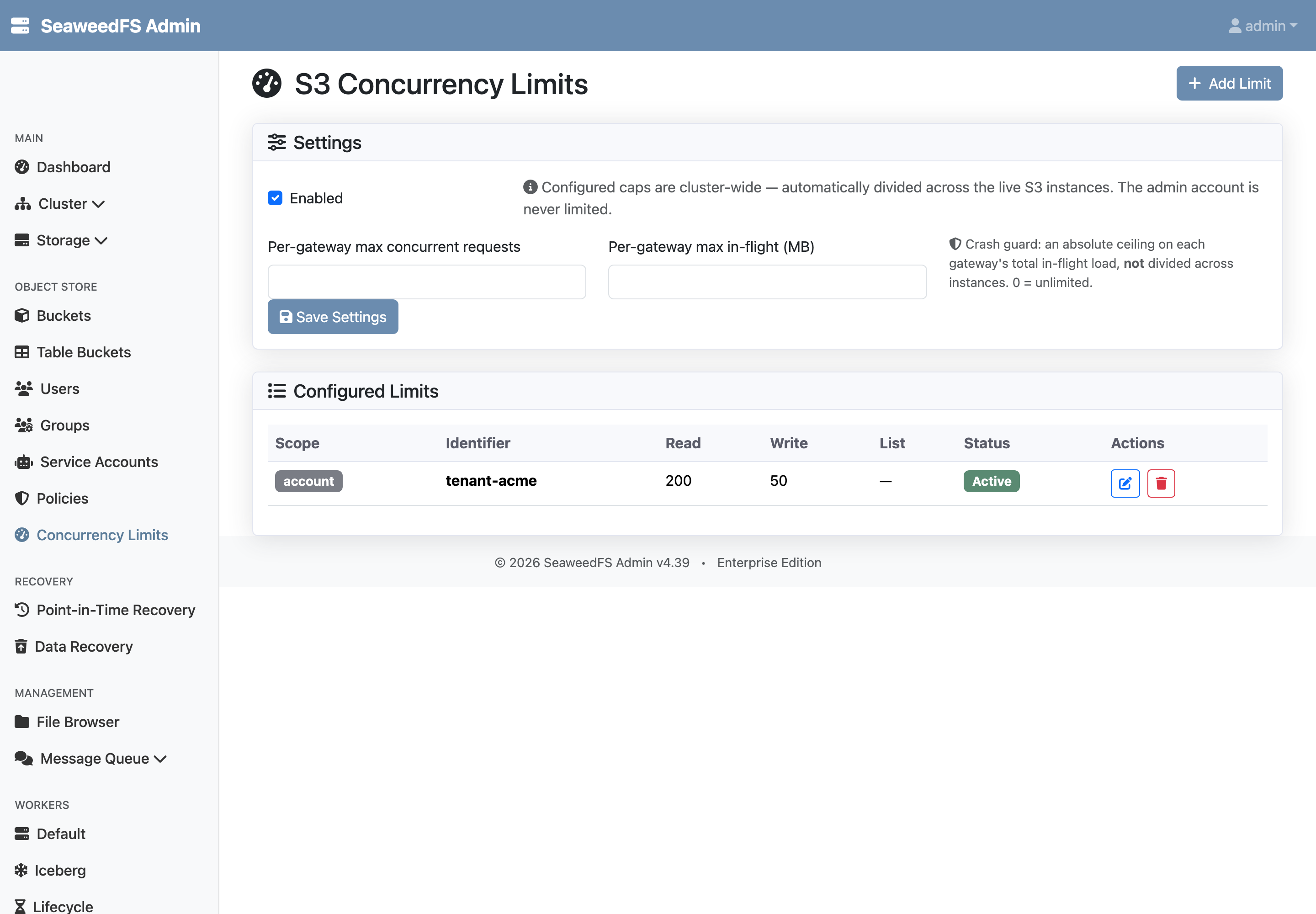
Management — Admin UI

A page under the Object Store section at /object-store/concurrency provides the same control without dropping to the shell:

  • A Settings card with the master switch (and a note that caps auto-divide across instances and the admin account is never limited).
  • A Configured Limits table with one row per scope — kind, identifier, the per-class (Read · Write · List) max-concurrent and max in-flight MB, and status — plus add / edit / delete.
  • The add/edit dialog picks the identifier from existing buckets, accounts, and access keys (free text is still allowed) and sets the per-class caps in a single save. In-flight size is entered in MB (1 MB = 1024×1024 bytes).

The admin UI and the shell write the same files through the same store, so the two surfaces are always consistent.

Observability

Rejections are visible without any new metric: a 503 rejection is counted by the existing SeaweedFS_s3_request_total{type=<action>, code="503", bucket=<bucket>} Prometheus counter (the same path the circuit breaker uses). The “S3 Errors by code” dashboard panel surfaces concurrency rejections as a rise in 503s for the affected action and bucket.

Relationship to the Circuit Breaker

SeaweedFS’s S3 circuit breaker already caps concurrency and in-flight bytes at the global and per-bucket scope, per action. Concurrency limiting is a superset: it keeps the global and bucket scopes, adds the account/tenant and access-key scopes the circuit breaker lacks, unifies everything in one config, and adds the admin UI. The s3.circuitBreaker shell command is deprecated in favor of s3.concurrency; existing circuit-breaker deployments keep working, and operators should migrate their global/bucket caps into the concurrency limiter.

Use Cases

1. SaaS noisy-neighbor protection

Each customer maps to an account/tenant. A per-account cap guarantees no single customer’s traffic can exhaust the gateway, while the global ceiling protects the cluster as a whole.

2. Taming a batch or export key

A nightly export job runs under its own access key. Cap that key to a handful of concurrent requests so it makes steady progress without ever competing with interactive traffic.

3. Protecting a hot public bucket

A bucket serving public assets gets a per-bucket Read cap, bounding how much of the gateway anonymous traffic can consume during a spike.

4. Upload-bandwidth guardrail

Set a per-tenant max in-flight bytes on the Write class so a burst of large multipart uploads can’t saturate gateway memory or backend bandwidth, even when the request count stays low.

Reference

Filer layout

Path Contents
/etc/s3/concurrency_limit/settings.json Master switch (enabled)
/etc/s3/concurrency_limit/global.json Global scope
/etc/s3/concurrency_limit/buckets/<bucket>.json Per-bucket scope
/etc/s3/concurrency_limit/accounts/<accountId>.json Per-account/tenant scope
/etc/s3/concurrency_limit/access_keys/<keyId>.json Per-access-key scope

Error semantics

Cap exceeded Error HTTP status
Max concurrent requests ErrTooManyRequest 503 Service Unavailable
Max in-flight bytes ErrRequestBytesExceed 503 Service Unavailable

Rejections are fail-fast — there is no request queuing. 503 is the status S3 SDKs retry with exponential back-off.

Key Benefits for Enterprise

  1. Per-tenant QoS: Concurrency and throughput slices keyed by access key, account, bucket, or global.
  2. Cluster-correct: Caps are cluster-wide, divided across live gateways automatically.
  3. Two dimensions: Limit both request count and in-flight bytes.
  4. Zero-impact opt-in: Off by default; byte-compatible with OSS SeaweedFS until enabled.
  5. No new dependencies: Config lives on the filer, hot-reloads, and reuses the standard 503 back-off contract.
  6. Two surfaces, one source of truth: Manage from the shell or the admin UI; both write the same files.