Admin Audit Log
SeaweedFS Enterprise records every administrative session against your cluster — who took the cluster lock, from where, every command they ran, what each command printed, and how the session ended. Sessions are stored as append-only files on the cluster itself, kept for 3 months, and browsable from the Admin UI or weed shell. There is nothing to configure and nothing to enable: auditing is always on.
Why it matters
The cluster-wide admin lock is already how SeaweedFS serializes dangerous operations — rebalancing, replication repair, credential changes. But in open-source SeaweedFS, what happened under that lock leaves no durable trace: a local shell history on someone’s workstation, transient log lines, nothing centralized. When a volume goes missing or a credential changes, “who ran what last Tuesday, and what did it print” has no answer.
The audit log answers it with the strongest evidence available: the actual command lines, their actual output, and the identity of the operator — recorded as the commands run, not reconstructed afterwards.
What gets recorded
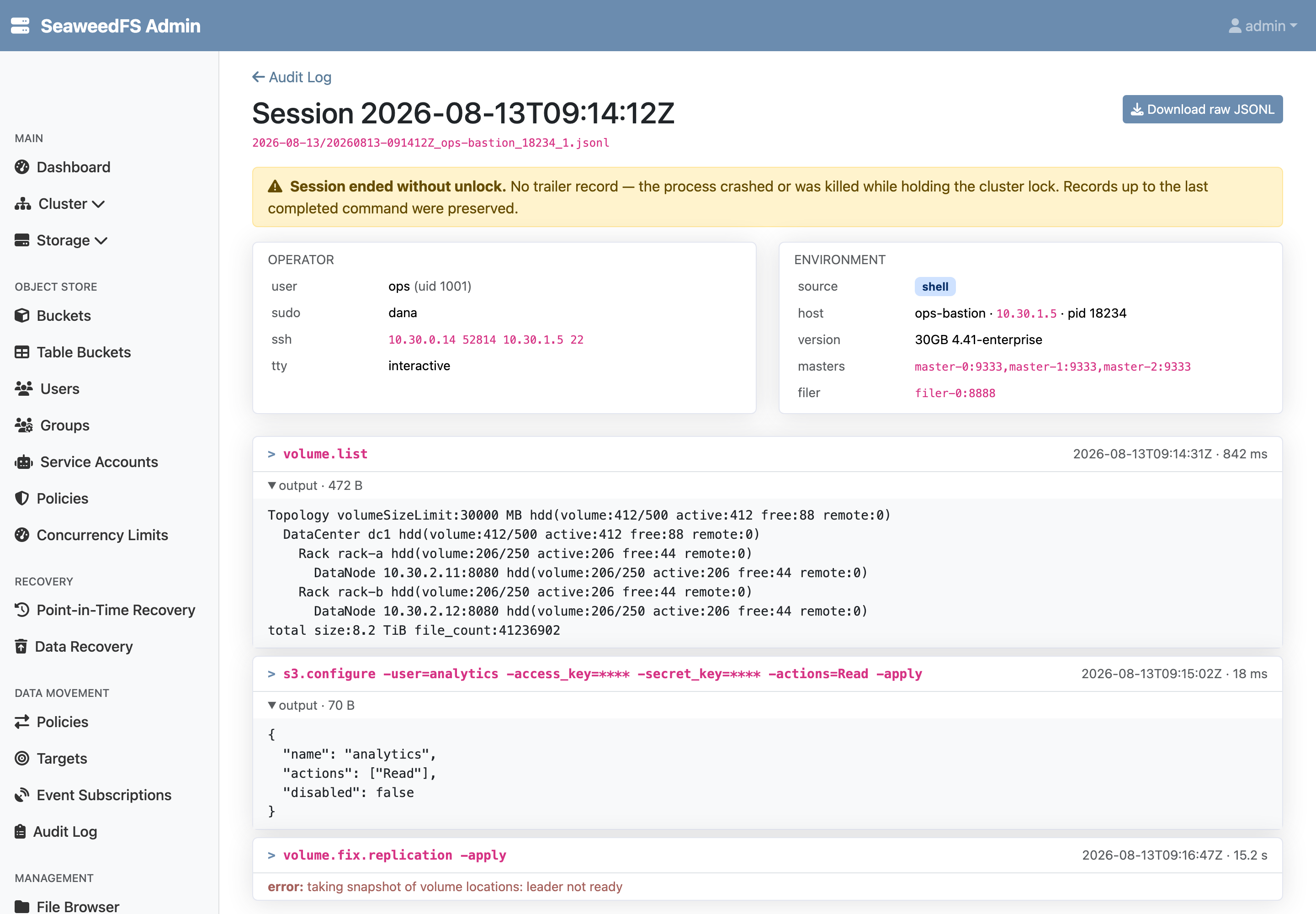
Every session starts with an identity header:
- the machine that held the lock (IP and hostname — the same client name the master’s lock registers, so audit files cross-check against master logs),
- the OS user, and the real operator behind
sudowhen the shell ran under a shared account, - the SSH origin — on a shared bastion host, the
ssh_connectionfield shows which workstation the session actually came from, - interactive terminal vs. piped script, process id, and the exact
weedversion that executed the commands.
Then one record per command — the command line, captured output, error, and duration — and a closing record with the end reason. Credential-bearing flags (-secret_key=…, -access_key=…, tokens, passwords) are masked in the recorded command line.
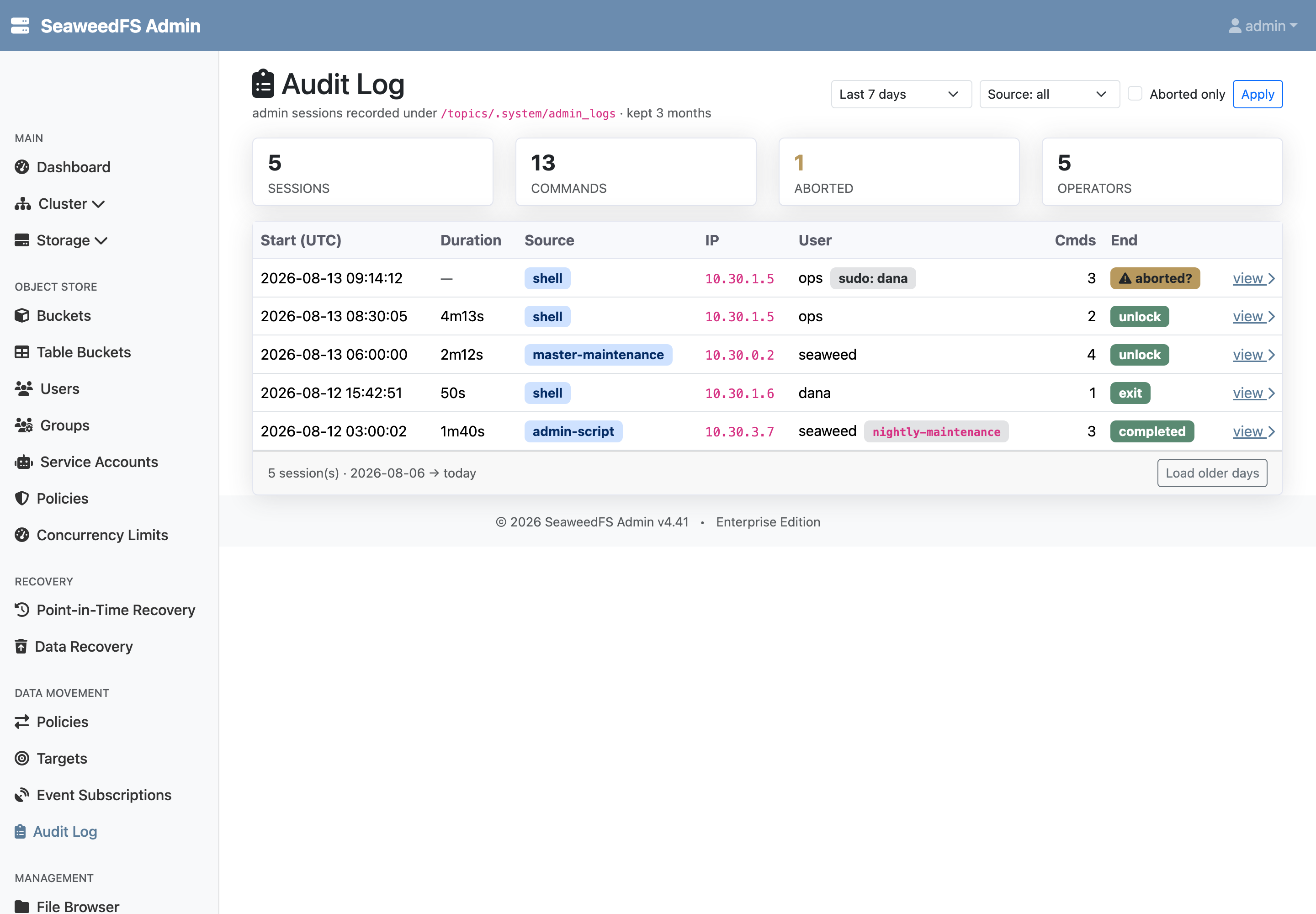
Three kinds of sessions are recorded, and the log labels each:
| Source | Session boundary |
|---|---|
shell |
an operator’s lock … unlock in weed shell |
master-maintenance |
each run of the master’s built-in maintenance scripts |
admin-script |
each admin-script worker job, with its job id, script name, and script hash |
Crashes leave evidence
Records are appended as each command completes, not when the session ends. If an admin process crashes or is killed while holding the lock, everything up to the last completed command is already safe on the cluster — and the missing closing record is itself the signal. The Admin UI flags such sessions as aborted and explains what that means.
Sessions are ordinary files
Audit sessions live on the filer under /topics/.system/admin_logs/, one JSONL file per session, partitioned by day. That means every way you already read files works: the Admin UI pages, fs.audit.ls and fs.audit.view in weed shell, fs.cat, the filer HTTP API piped into jq, or a mount. The Admin UI also serves a raw JSONL download for archiving a session into a ticket or compliance record.
Retention is automatic: sessions carry a 3-month TTL, enforced by the same volume-level TTL machinery SeaweedFS uses for regular data — expired sessions disappear from listings and their storage is reclaimed wholesale, with no cleanup job to schedule.
Designed to stay out of the way
- Always on, zero configuration. No flags, no toggles — an audit trail that has to be enabled in advance is rarely there when needed.
- Zero noise. A session in which no command ran writes nothing at all; look-only sessions leave no files.
- Never in the way. Audit persistence cannot block or fail an admin command; if the filer is briefly unreachable, records queue and retry.
One honest note on scope: the audit log is operational evidence, recorded cooperatively by SeaweedFS’s own tools. Command lines have credentials masked, but command output is captured verbatim — and like any client-side recording, it documents the actions of operators using standard tooling rather than defending against a hostile administrator who holds cluster credentials.
Availability
The admin audit log is an Enterprise feature, included in all Enterprise plans. Sessions record from all three surfaces from the moment you upgrade — no migration, no setup.