An Iceberg or Lance table bucket stores two very different things in one place. The metadata — *.metadata.json, Avro manifests, version hints — is small, rewritten on every commit, and read on the critical path of every query. The data — Parquet, ORC, Lance files — is large, written once, and mostly cold. You want the metadata on the fastest disks you have, replicated for durability, and you want the bulk data to get cheaper as it ages.
SeaweedFS Enterprise does exactly this with two ideas: a volume class routes each write to the right tier by its path, and a tiering profile ages cold volumes down a ladder — replicated → erasure-coded → cloud. Nothing hand-waved below: every command was run on a real cluster with separate SSD and HDD volume servers, and every output and screenshot is a capture from that session.
The three levers
- A disk type (“volume class medium”) is a tag on a volume server. You start servers with
-disk ssdor-disk hdd(any tag works —nvme,hdd_bulk, …). A volume’s identity includes its disk type, so writes of different types never share a volume. - A volume class routes a write by its path. Selector rules are glob patterns against the object path → a class (
meta,data). SeaweedFS ships the table-format conventions built in, so for Iceberg/Delta/Hudi you usually write no selectors at all —**/metadata/**,**/*.metadata.json,**/*.avro,**/_delta_log/**,**/.hoodie/**already resolve tometa, and**/*.parquet,**/*.orctodata. (The order is deliberate: a Delta checkpoint is a.parquetfile under_delta_log/, and it correctly lands asmeta.) - A tiering profile is the ladder for a class. A profile has a landing (where new volumes are created — a disk type + replication code) and a list of tiers it descends into as the volume goes quiet: another replicated disk type, an erasure-coded form, or a remote cloud backend.
You bind (collection, class) → profile, and the filer resolves the class on the write path — so an S3 PUT to …/metadata/v1.metadata.json and a PUT to …/data/part-0.parquet land on different tiers, server-side, with no client changes.
The cluster
Two SSD servers and two HDD servers, tagged with -disk:
# fast tier — two servers so metadata can be replicated
weed volume -dir=/data/ssd1 -disk=ssd -mserver=:9533 -dataCenter=dc1 -rack=r1 -port=8571
weed volume -dir=/data/ssd2 -disk=ssd -mserver=:9533 -dataCenter=dc1 -rack=r1 -port=8572
# capacity tier — HDD, several disks each so EC has somewhere to spread
weed volume -dir=/data/h1a,/data/h1b,/data/h1c -disk=hdd,hdd,hdd -mserver=:9533 -dataCenter=dc1 -rack=r1 -port=8581
weed volume -dir=/data/h2a,/data/h2b,/data/h2c -disk=hdd,hdd,hdd -mserver=:9533 -dataCenter=dc1 -rack=r1 -port=8582
The tiering config
The whole policy is one protojson document applied with tiering.apply. Because the metadata/data selectors are built in, all we write is two profiles and two bindings:
{
  "tailClass": "meta",
  "profiles": [
    { "name": "hot-meta",
      "landing": { "diskType": "ssd", "replication": "001" } },

    { "name": "cold-data",
      "landing": { "diskType": "hdd", "replication": "001" },
      "tiers": [
        { "name": "ec", "when": { "quietForSeconds": 604800 },
          "ec": { "diskType": "hdd", "dataShards": 10, "parityShards": 4 } }
      ] }
  ],
  "bindings": [
    { "collectionPattern": "vec", "volumeClass": "meta", "profileName": "hot-meta" },
    { "collectionPattern": "vec", "volumeClass": "data", "profileName": "cold-data" }
  ]
}
echo 'tiering.apply -file=/tmp/tiering.json' | weed shell -master=:9533
applied tiering config revision 1: 2 profile(s), 2 binding(s)
hot-meta keeps metadata on SSD, replicated (001 = a second copy on another node), and never ages it down. cold-data lands on HDD replicated, then erasure-codes a volume once it has been quiet for a week (quietForSeconds). The tailClass line we will come back to — it is how Parquet footers stay fast even after the file bodies age away.
Where the writes land
Write a table’s metadata and a couple of Parquet files into the bucket. (These use weed filer.copy; an S3 PUT to the same keys classifies identically — the filer resolves the class from the object path.)
weed filer.copy v1.metadata.json snap-123.avro version-hint.text \
  http://:8588/buckets/vec/ml/embeddings/metadata/
weed filer.copy part-00000.parquet part-00001.parquet \
  http://:8588/buckets/vec/ml/embeddings/data/
volume.list shows the metadata volumes on the SSD servers, replicated 001 — the same volume id present on both :8571 and :8572:
DataNode 127.0.0.1:8571 ... ssd(volume:8/30 ...)
    volume Id:11, Size:6216, ReplicaPlacement:001, Collection:vec, FileCount:2 ...   ← Avro manifests
    volume Id:12, Size:128,  ReplicaPlacement:001, Collection:vec, FileCount:1 ...   ← v1.metadata.json
DataNode 127.0.0.1:8572 ... ssd(volume:8/30 ...)
    volume Id:11, Size:6216, ReplicaPlacement:001, Collection:vec, FileCount:2 ...   ← 2nd replica
    volume Id:12, Size:128,  ReplicaPlacement:001, Collection:vec, FileCount:1 ...
The Parquet data, meanwhile, is on the HDD servers — also replicated 001, nothing erasure-coded yet. Here is the cluster in the Admin UI: the two SSD servers hold a few KB of replicated metadata and no EC shards; the two HDD servers hold the replicated data.
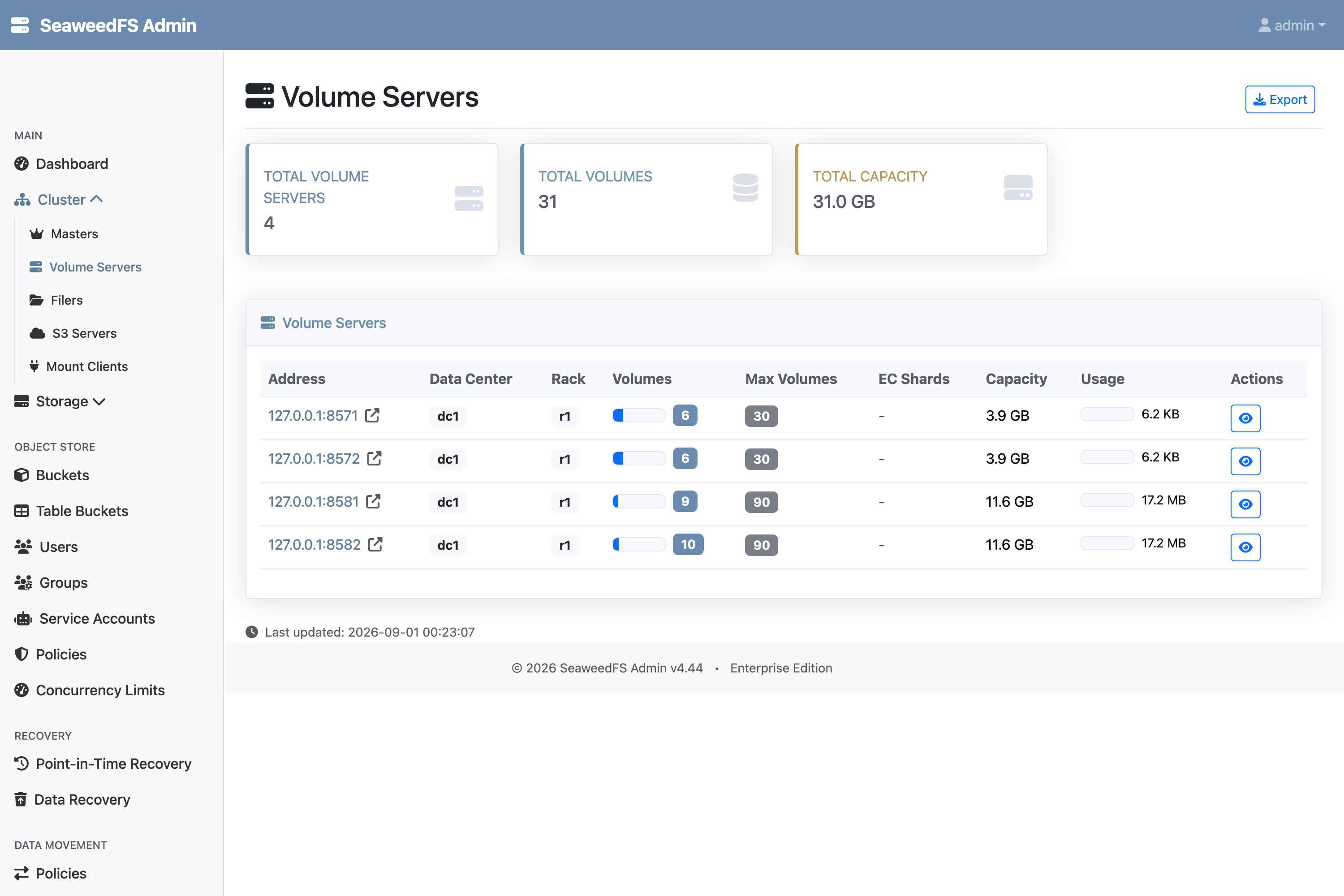
That split happened at write time, automatically — the built-in selector sent every …/metadata/… object to the meta class (SSD) and every .parquet to the data class (HDD). No per-table rule, no client hint.
Aging the data into erasure coding
The cold-data profile declares that a quiet data volume should become erasure-coded on HDD. That transition is what the volume_tiering worker applies as data goes quiet; to see the result immediately rather than wait out the week-long timer, we run the same step directly with ec.encode -diskType hdd (10 data + 4 parity shards):
markVolumeReadonly 16 on 127.0.0.1:8581 ...
markVolumeReadonly 16 on 127.0.0.1:8582 ...
volume 16: all 2 replicas are consistent (file count: 1)
generateEcShards 16 (collection "vec") on 127.0.0.1:8581 ...
mount 16.[0 1 2 3 4 5 6 7 8 9 10 11 12 13] on 127.0.0.1:8581
Deleting original volumes after EC encoding...
deleted volume 16 from 127.0.0.1:8581
deleted volume 16 from 127.0.0.1:8582
Successfully completed EC encoding for 1 volumes
Each data volume becomes 14 shards; the two replicated copies are removed. The metadata is untouched — volume.list still shows volumes 11 and 12 replicated 001 on the SSD servers. In the Admin UI the change is stark: the HDD tier now reports EC Shards where the data used to be, and the SSD tier is exactly as before.
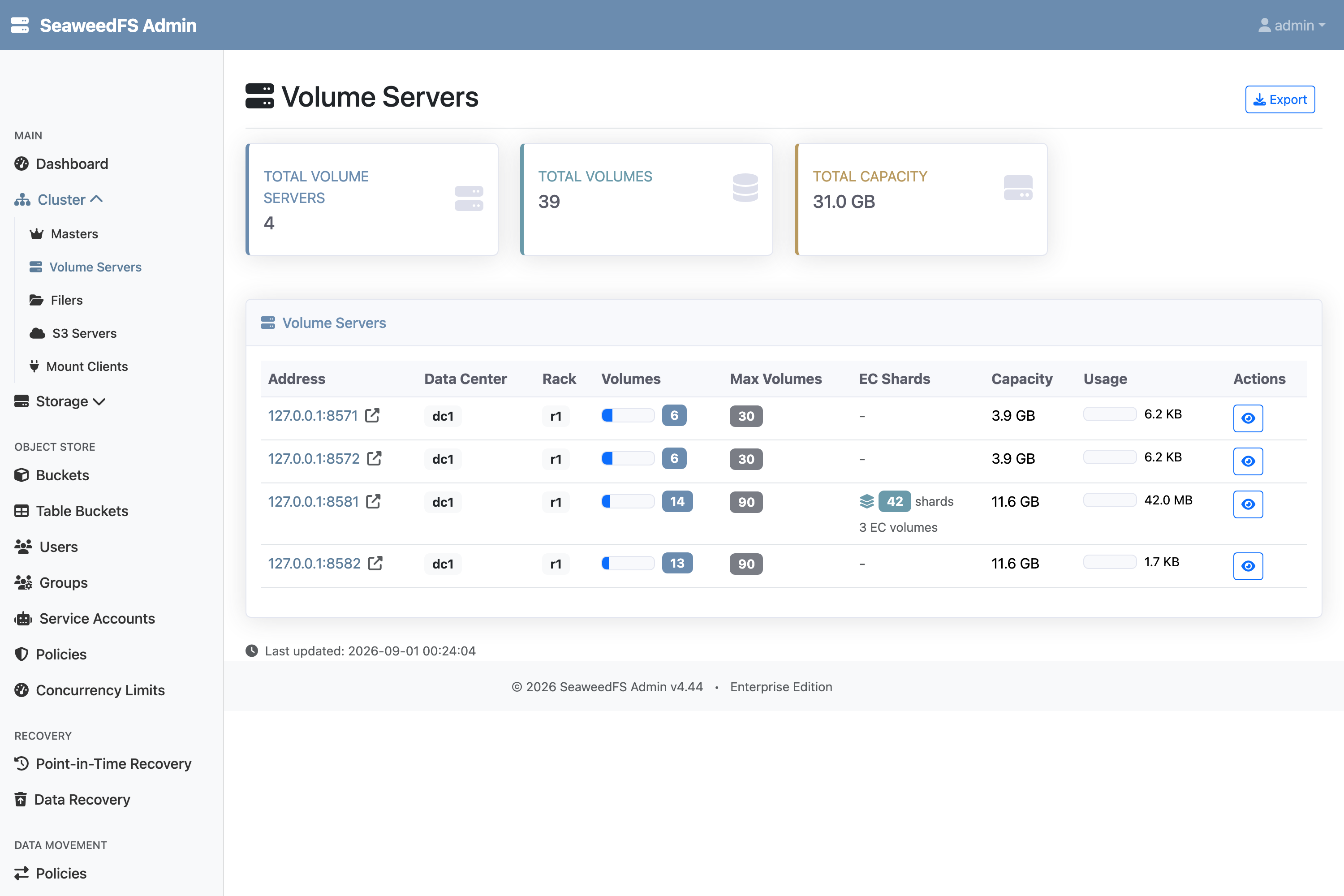
That is the whole story of use case A: hot metadata stays fast and replicated; cold data drops to erasure coding on cheaper disks. At scale, EC costs ~1.4× the raw bytes for the durability of triple replication — you pay it only for data that has stopped changing. (The small demo volumes here have high per-shard padding, so don’t read the MB figures as the savings ratio.)
The catch: a Parquet footer is hot metadata
There is a leak in the split above. A .parquet file is classified data, so the whole file — including its footer — erasure-codes onto cold HDD. But that footer (the schema, row-group offsets, and column statistics, plus the ColumnIndex/OffsetIndex page index just before it) is read on the critical path of every query: an engine reads the footer first to decide which row groups and pages to touch. If it lives on cold EC storage, every query planning read pays cold-tier latency and an EC reconstruct — for a few kilobytes at the end of the file.
That is the tailClass line in the config, and the Cache Parquet Footers job (tail_cache) that acts on it. Enable the job and it keeps each Parquet file’s footer on fast media, independent of where the body tiers:
# opt-in, like the other plugin jobs
curl -X PUT  :23646/api/plugin/job-types/tail_cache/config -d '{"enabled":true}'
To see it act, we wrote a real 11.4 MB Parquet file (generated with DuckDB — 8 row groups, a genuine footer and page index) into the bucket’s data/ prefix. Fifteen seconds later, with no manual trigger, the job’s run history reported:
"outcome": "success", "message": "cached 65536 bytes in class \"meta\""
The file’s entry now carries a cached range alongside its body chunks — the last 64 KiB of the file, held in a volume on the fast tier:
"cacheChunks": [
    "fileId": "12,047ac94de8",
    "offset": "11345950",        ← fileSize − 64 KiB
    "size":   "65536",
$ curl ":9533/dir/lookup?volumeId=12"     # where do the cached bytes live?
{"locations":[{"url":"127.0.0.1:8572",...},{"url":"127.0.0.1:8571",...}]}   # both SSD nodes
The mechanism:
- Candidates come from the filer’s metadata stream, not a rescan. A warehouse has millions of objects; re-walking them each cycle to find the handful written since last time is the wrong shape. The follower only ever sees new writes — anything older is an explicit backfill.
- It caches the hot region, floored at the read engines actually issue. The job parses the footer to find where the page index (
ColumnIndex/OffsetIndex) begins — a selective reader fetches that before any data page — and widens the extent to at least 64 KiB of tail, because most engines (Arrow’s default) open a Parquet file with a single speculative read of its last 64 KiB. A smaller cached extent would leave that opening read straddling into the cold body; at 64 KiB it is served entirely from fast media. The bytes are uploaded to the tail class (metahere → SSD, replicated per its landing) and recorded on the entry ascacheChunks, separate from the bodychunks. - The cache follows the body’s lifecycle. A
cacheChunkis stamped against the body’s chunks, so rewriting the file supersedes it — and the write-back is guarded by an inode + mtime precondition, so a rewrite that lands mid-caching wins cleanly. An encrypted (PARE) footer that will not parse still gets its 64 KiB tail cached rather than nothing.
Net: the Parquet body erasure-codes onto cold HDD exactly as above, while its footer is served from SSD. Query planning stays on the fast tier; only the row groups a query actually reads come off the cold tier.
Two more shapes of the same machinery
Age all the way to cloud. The ladder is not limited to EC. Add a remote tier and a volume that has been cold for, say, 90 days is uploaded to an S3/GCS/Azure backend, its bytes freed locally:
{ "name": "hot-meta",  "landing": { "diskType": "ssd", "replication": "001" } },
{ "name": "cold-data", "landing": { "diskType": "hdd", "replication": "001" },
  "tiers": [
    { "name": "ec",     "when": { "quietForSeconds": 604800 },
      "ec": { "diskType": "hdd", "dataShards": 10, "parityShards": 4 } },
    { "name": "remote", "when": { "quietForSeconds": 7776000 },
      "remote": { "backend": "s3.archive" } }
  ] }
That is the classic hot → warm → cold → frozen lifecycle for backups, logs, and old table snapshots — expressed as one profile.
A fast tier that can’t overflow. Small NVMe/SSD tiers are the thing you least want to babysit. A pressure block per medium demotes the coldest volumes off a filling disk ahead of their age trigger, so the hot tier drains itself instead of filling up. It is capacity relief, not policy — the age ladder still governs everything else.
Two smaller notes on the same theme: a write-heavy ingest landing zone is just a landing on NVMe that ages to HDD+EC once volumes seal; and for compliance, the guidance baked into the design is to raise replication on the metadata class and never EC or remote-tier it, while the data class takes the full ladder down.
How it works
- Disk types are free-form tags on volume servers (
-disk); the master places and grows volumes per type, and a volume’s layout key includes it — so tiers never share storage. - Selectors (glob → class) run on the filer’s write path; the built-in Iceberg/Delta/Hudi rules mean the metadata/data split is on by default and inert until a binding uses the class.
- Profiles are demotion-only ladders — landing (replicated) → EC → remote — with per-tier triggers (
quietForSeconds, fullness). Thevolume_tieringworker converges each bound volume onto its ladder as it cools;ec.encode/volume.tier.move/volume.tier.uploadare the same transitions on demand. - Footers are pinned separately from bodies. The
tail_cachejob follows the filer’s metadata stream and copies each Parquet file’s footer + page index into thetailClasson fast media, recorded ascacheChunkson the entry — so query planning never follows the body down the ladder. - Placement is automatic at write time; the ageing transitions are what the worker (or those shell commands) apply as data goes quiet.
Wrap
A table bucket is the perfect shape for this: its metadata is small, hot, and constantly rewritten (so it is always young and always on the fast tier), while its data is large, write-once, and cools predictably into erasure coding. With built-in selectors you get the metadata/data split for free — declare two profiles, bind them, and the fast path stays fast while the bulk gets cheaper on its own.
Volume classes and tiering profiles are a SeaweedFS Enterprise feature. Everything above ran on a single machine with four volume servers.
Sources: every step above — write-time placement, erasure coding, and the Parquet-footer cache — was exercised live on the cluster shown, and every output block is a capture from that session. Disk-type placement, volume_tiering (profiles, selectors, tiering.apply), and the tail_cache (“Cache Parquet Footers”) job are SeaweedFS Enterprise.
Related: Volume Tiering docs · Erasure coding · S3 Table Buckets · Iceberg table maintenance · Move data to another cluster or cloud