A data warehouse asks more of object storage than most workloads: hot table metadata on every query’s critical path, terabytes of columnar data that cools fast, bursty ETL writes next to latency-sensitive BI reads, and growth on two independent axes — access throughput and storage capacity. This post sets up a SeaweedFS cluster shaped for exactly that, with the practices we recommend at each layer.
The deployment itself is one YAML file and one command — seaweed-up installs and manages every component below over SSH. So this post starts with that file, then spends its time where the value is: what each plane does, the policies to set on top, and the practices that matter. Nothing hand-waved: every output block and screenshot is a real capture from a live cluster with this exact topology (run as direct processes on one box for reproducibility — the per-component flags shown in each section are precisely what seaweed-up manages for you). One deliberate omission: we show functional scale-out live, and leave throughput numbers to your own hardware.
1. One file, one deploy: seaweed-up
Everything in the architecture above — masters, tiered volume servers, filers, S3 gateways, the admin, the workers, and even the monitoring stack — deploys from a single YAML file with seaweed-up, which installs, upgrades, and scales SeaweedFS clusters over SSH. This is the warehouse topology of this post in its schema (adapted from the repository’s examples/typical.yaml):
global:
  dir.conf: "/etc/seaweed"
  dir.data: "/opt/seaweed"
  volumeSizeLimitMB: 30000
  replication: "010"
  s3_config:
    identities:
      - name: warehouse
        credentials: [{accessKey: warehouse_key, secretKey: CHANGE_ME}]
        actions: [Read, Write, List, Tagging]

master_servers:                       # §2 — the control plane
  - {ip: 10.0.0.11, port: 9333}
  - {ip: 10.0.0.12, port: 9333}
  - {ip: 10.0.0.13, port: 9333}

volume_servers:                       # §3 — the storage plane
  - ip: 10.0.0.21                     # fast tier
    rack: r1
    folders: [{folder: /nvme, disk: ssd}]
  - ip: 10.0.0.22
    rack: r2
    folders: [{folder: /nvme, disk: ssd}]
  - ip: 10.0.0.23                     # capacity tier — one folder per physical disk
    rack: r1
    folders: [{folder: /d1, disk: hdd}, {folder: /d2, disk: hdd}, {folder: /d3, disk: hdd}]
  - ip: 10.0.0.24
    rack: r2
    folders: [{folder: /d1, disk: hdd}, {folder: /d2, disk: hdd}, {folder: /d3, disk: hdd}]

filer_servers:                        # §4 — the access plane
  - {ip: 10.0.0.31, port: 8888}
  - {ip: 10.0.0.32, port: 8888}

s3_servers:                           # inherit global.s3_config
  - {ip: 10.0.0.51}
  - {ip: 10.0.0.52}

admin_servers:                        # §5 — the management plane
  - {ip: 10.0.0.61, port: 23646, admin_user: admin, admin_password: CHANGE_ME}
worker_servers:                        # scale with the job queue
  - {ip: 10.0.0.61}                    # jobType defaults to "all"
  - {ip: 10.0.0.62}
  - {ip: 10.0.0.63, jobType: heavy}    # heavy pool: EC, vacuum, Iceberg/Lance table maintenance

monitoring:                           # §10 — Prometheus + Grafana + node_exporter
  host: 10.0.0.61
  grafana_admin_user: admin
  grafana_admin_password: CHANGE_ME
go install github.com/seaweedfs/seaweed-up@latest
seaweed-up cluster deploy  -f warehouse.yaml --enterprise       # install + start everything
seaweed-up cluster upgrade -f warehouse.yaml --enterprise --version=latest   # rolling, later
seaweed-up cluster scale ...                                    # §11's story, automated
The --enterprise flag matters for this post: it pulls the SeaweedFS Enterprise binaries (from the enterprise release repo) instead of the OSS build — and the policy layer everything below configures — volume tiering, the Parquet footer cache, QoS scopes, the admin’s plugin workers — is Enterprise. The free tier covers development and testing up to 25 TB, so the same flag serves an evaluation cluster.
Deployment also prepares the hosts (ulimits, sysctls) and, with the monitoring block present, stands up node_exporter on every host plus Prometheus and Grafana with the bundled SeaweedFS dashboard — metrics ports are assigned automatically. (Config and commands per the seaweed-up repository; the section references in the comments point at the rest of this post.)
The remaining sections open the hood on this cluster: what each plane is, the policy layer a warehouse needs on top — tiering, erasure coding, QoS, write spread — and live proof of how it scales.
2. The control plane: three masters, raft
Masters hold placement state and assign writes; everything else is data path. The master_servers block runs three, so the cluster survives a master loss; the two global settings matter most up front because they are awkward to change later. Per master, seaweed-up manages the equivalent of:
weed master -port=9533 -mdir=/data/m1 -peers=m1:9533,m2:9534,m3:9535 \
     -volumeSizeLimitMB=64 -defaultReplication=010 -metricsPort=9121
# ... same on the other two masters, each with its own -mdir
$ curl -s master1:9533/cluster/status
{"IsLeader":true,"Leader":"127.0.0.1:9533.19533","Peers":["127.0.0.1:9534.19534","127.0.0.1:9535.19535"]}
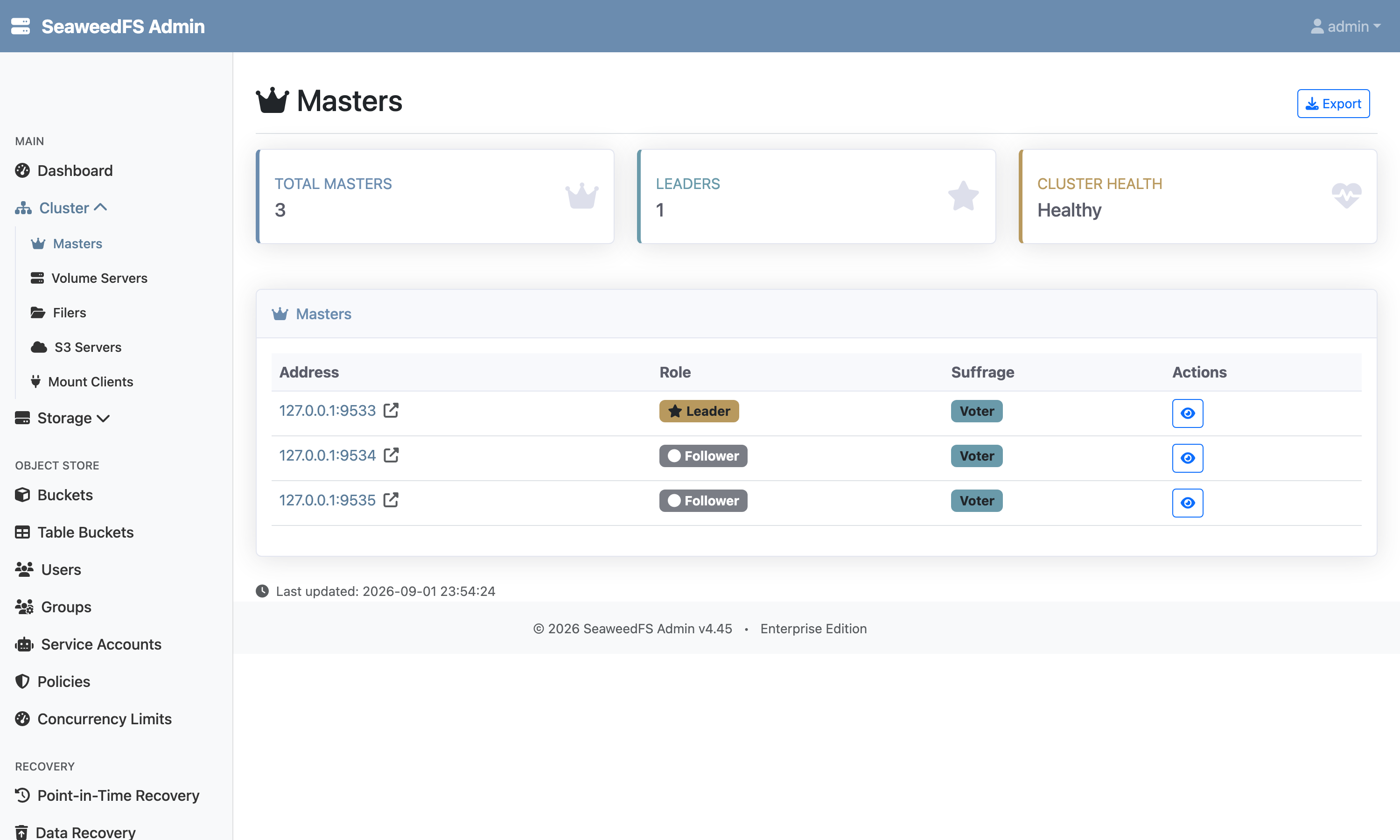
Best practices: always an odd number of masters (three is right for almost everyone); put -volumeSizeLimitMB where your workload wants it (smaller volumes spread wider and erasure-code in finer units; larger volumes mean fewer of them to manage); and pick -defaultReplication to match your failure domains — which brings us to racks.
3. The storage plane: tiers are tags, racks are real
Volume servers declare what they are with two things you saw in the YAML: disk tags the medium, rack (and dataCenter) declare the failure domain. We run an SSD pair and an HDD pair, split across racks r1/r2 — per server, the equivalent of:
# fast tier
weed volume -port=8571 -dir=/nvme -disk=ssd -max=30 -mserver=<masters> -dataCenter=dc1 -rack=r1
weed volume -port=8572 -dir=/nvme -disk=ssd -max=30 -mserver=<masters> -dataCenter=dc1 -rack=r2
# capacity tier — one -dir entry per physical disk
weed volume -port=8581 -dir=/d1,/d2,/d3 -disk=hdd,hdd,hdd -max=30,30,30 -mserver=<masters> -dataCenter=dc1 -rack=r1
weed volume -port=8582 -dir=/d1,/d2,/d3 -disk=hdd,hdd,hdd -max=30,30,30 -mserver=<masters> -dataCenter=dc1 -rack=r2
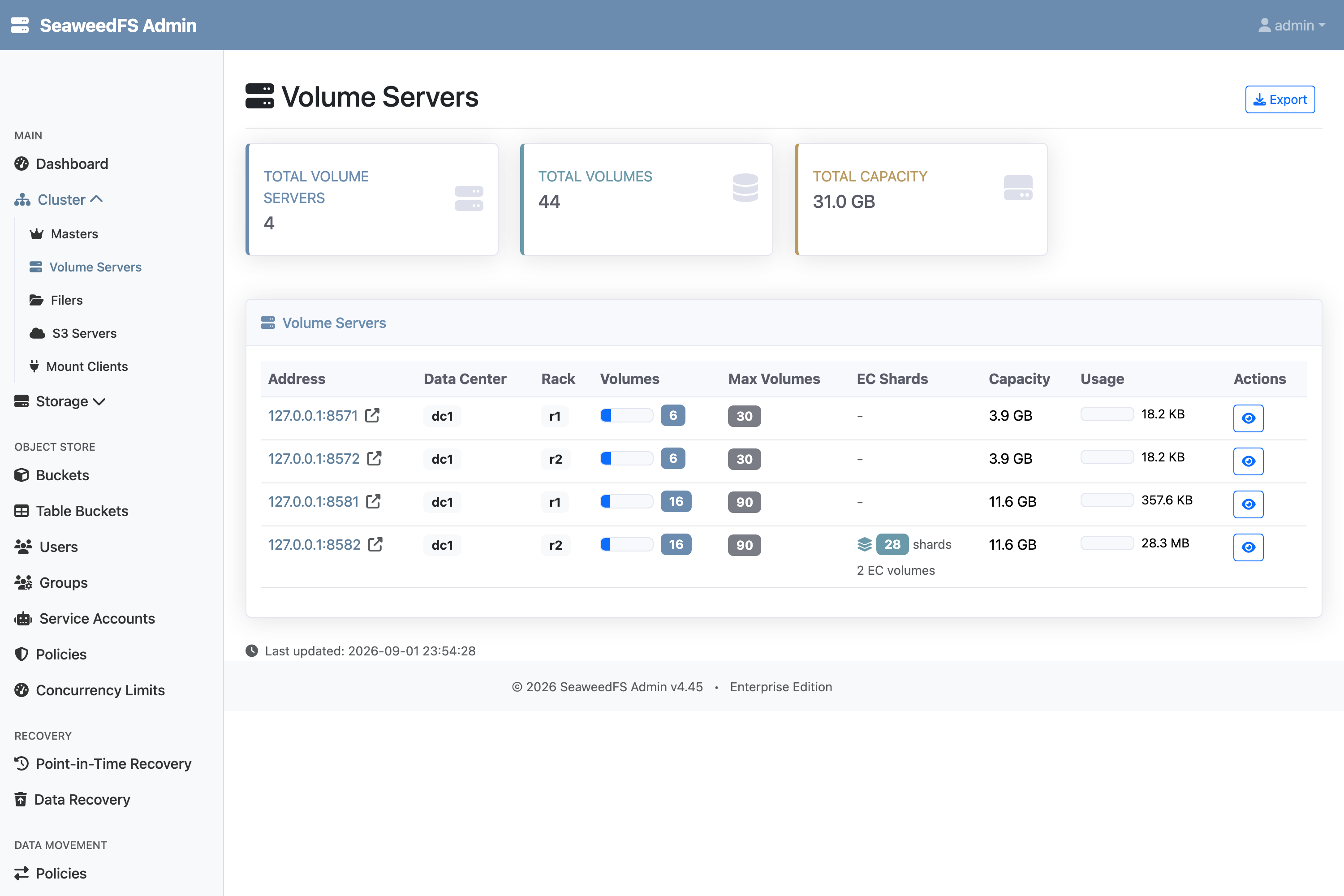
Best practices — learned the hard way in this very walkthrough: replication codes and rack layout must agree. Our first attempt paired -defaultReplication=001 (a same-rack copy) with one server per rack per tier — a placement that cannot exist, so every write hung waiting for volume growth. With one server per rack, 010 (a copy in another rack) is the honest choice, and the better durability story anyway. Also: one -dir entry per physical disk — SeaweedFS treats each directory as a disk for spreading and concurrency, so hiding eight drives behind one RAID mount forfeits placement intelligence.
4. The access plane: identities, a bucket, and stateless gateways
S3 gateways are separate weed s3 processes pointed at the filer. Scope identities to what each side of the warehouse actually does:
{"identities":[
  {"name":"warehouse","credentials":[{"accessKey":"warehouse_key","secretKey":"..."}],
   "actions":["Read","Write","List","Tagging"]},
  {"name":"anonymous","actions":["Read"]}
]}
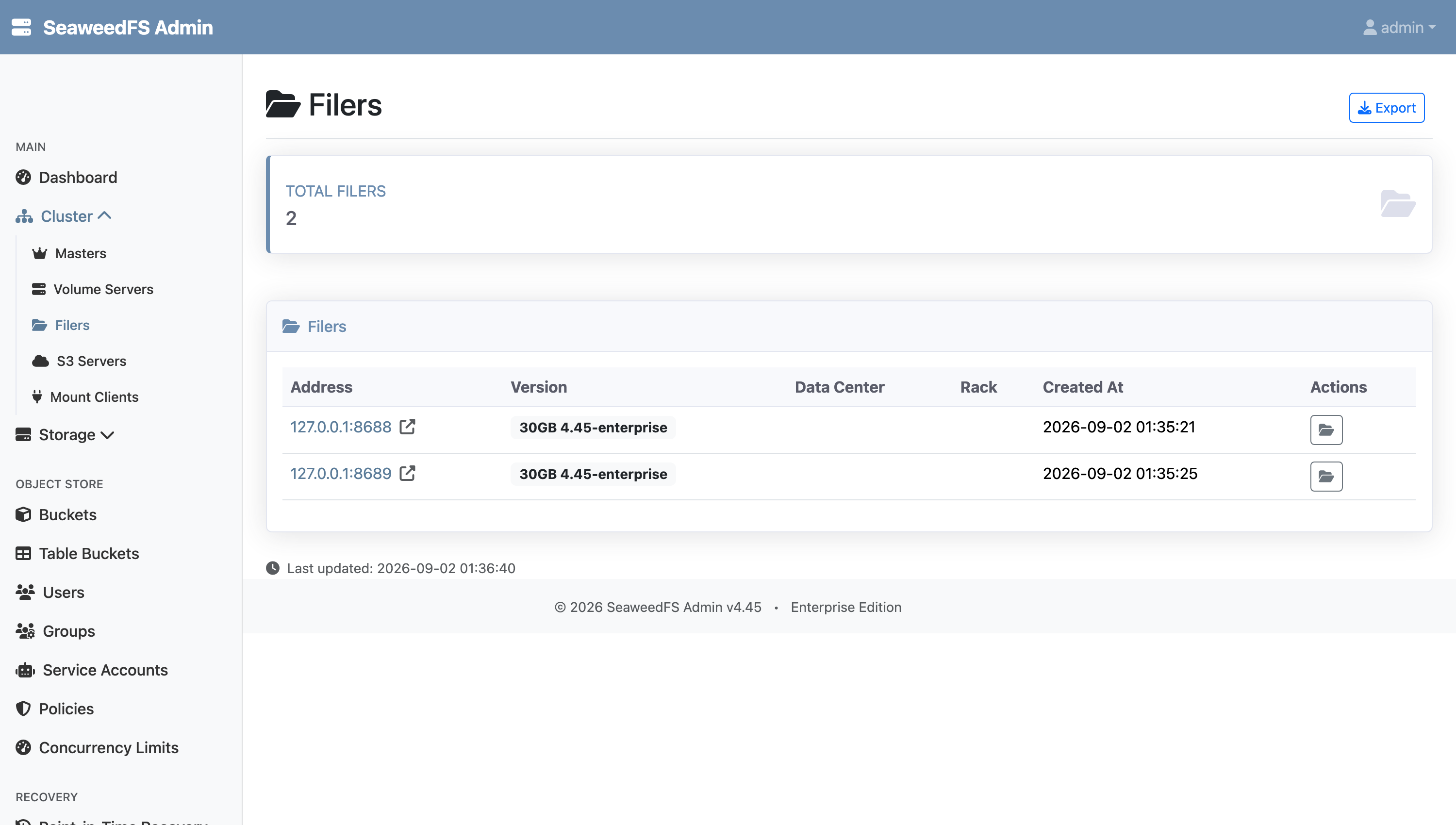
The filer_servers and s3_servers blocks give you two filers and two gateways; every gateway knows the whole filer list (the -filer flag is comma-separated for exactly this):
weed filer -port=8688 -master=<masters> -metricsPort=9124
weed filer -port=8689 -master=<masters> -metricsPort=9128   # second filer, its own local store
weed s3 -filer=filer1:8688,filer2:8689 -port=8433 -config=s3.json -metricsPort=9125
weed s3 -filer=filer1:8688,filer2:8689 -port=8434 -config=s3.json -metricsPort=9126
Filers discover each other through the masters and keep their local stores in sync by subscribing to each other’s metadata events — writes that went through one filer are listable on the other:
filer 8688: /buckets/lake/wh/orders/metadata → snap-9021.avro, v3.metadata.json, version-hint.text
filer 8689: /buckets/lake/wh/orders/metadata → snap-9021.avro, v3.metadata.json, version-hint.text
$ echo 's3.bucket.create -name lake' | weed shell -master=<master>
created bucket lake
Both gateways serve the same namespace immediately — same object, either port:
gw 8433: metadata/v3.metadata.json
gw 8434: metadata/v3.metadata.json
Worth being precise about what flows where, because it is why this design scales: a gateway asks a filer only for metadata — which chunks make up an object and which volumes hold them — and then streams the chunk data directly to and from the volume servers. On a write it obtains a volume assignment through the filer, uploads chunks straight to the volume servers, and records the entry; on a read it resolves the entry and fetches chunks from the volume servers itself. Object bytes never funnel through the filers or the masters.
Best practices: two filers and two gateways from day one — gateways hold no state and fail over across the filer list; filers with local stores sync automatically at this scale, and very large namespaces can move to a shared store (Postgres, Redis) later without changing the gateways; one bucket per warehouse/domain — each bucket gets its own collection, which is the unit tiering, QoS and lifecycle policies bind to; least-privilege identities per pipeline.
5. The management plane: admin + workers
Everything from here on — the tiering policy, the footer cache, erasure-coding jobs, QoS configuration, and every screenshot in this post — is managed by the admin server and executed by plugin workers:
# the admin_servers / worker_servers blocks run the equivalent of:
weed admin -port=23646 -master=<masters> -dataDir=/data/admin
weed worker -admin=admin:23646 -jobType=all -workingDir=/data/worker -maxExecute=4
The admin serves the UI, stores the policies (the tiering document, QoS scopes, movement policies), and schedules plugin jobs; workers connect outbound to the admin — no inbound ports to open — and run the actual work: tiering transitions, Parquet footer caching, EC repair, scrub, vacuum — and table maintenance for both Iceberg and Lance (small-file/fragment compaction, index optimization, version cleanup), each on its own scheduling lane.
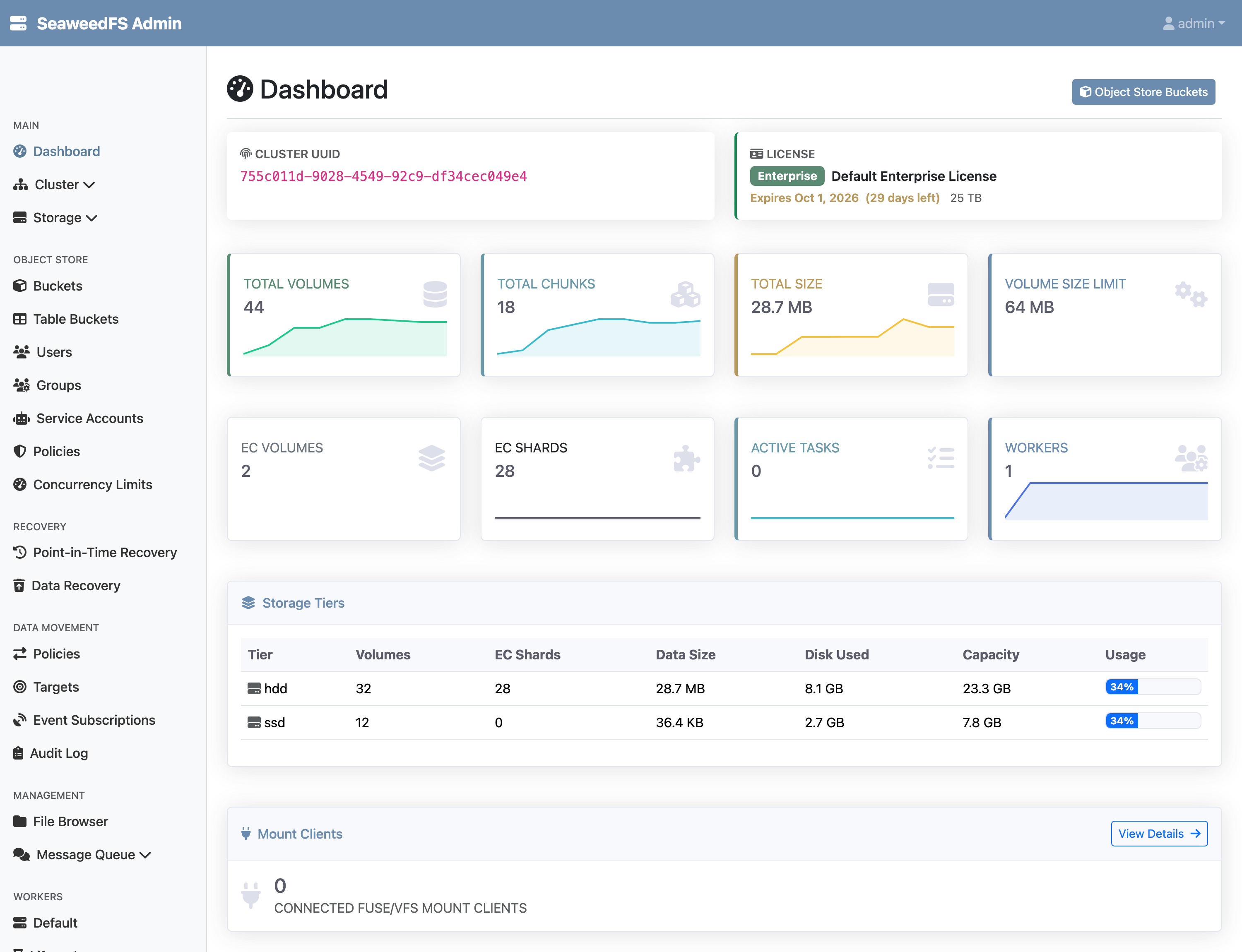
Best practices: the admin is deliberately a single instance — give it a durable -dataDir (job state persists there) rather than a second copy. Workers scale horizontally — just add worker_servers entries as maintenance queues back up — and job types shard across pools with per-worker jobType: all is right to start, and heavy job types (EC repair, vacuum) earn a dedicated pool whose -workingDir has real disk behind it — tasks stage volume data there, and the system temp dir is commonly RAM-backed tmpfs. And the data path does not depend on this plane: replication keeps flowing even through an admin outage, with workers scheduling admin-optional work locally until it returns.
6. The tiering policy: metadata fast, data cheap
A warehouse stores two very different things under one bucket: tiny, hot table metadata and large, cooling columnar data. Volume tiering splits them by path — the Iceberg/Delta/Hudi conventions are built in — and ages each down its own ladder. One document says all of it:
{ "tailClass": "meta",
  "profiles": [
    { "name": "hot-meta",  "landing": { "diskType": "ssd", "replication": "010" } },
    { "name": "cold-data", "landing": { "diskType": "hdd", "replication": "010" },
      "tiers": [ { "name": "ec", "when": { "quietForSeconds": 604800 },
                   "ec": { "diskType": "hdd", "dataShards": 10, "parityShards": 4 } } ] } ],
  "bindings": [
    { "collectionPattern": "lake", "volumeClass": "meta", "profileName": "hot-meta" },
    { "collectionPattern": "lake", "volumeClass": "data", "profileName": "cold-data" } ] }
$ echo 'tiering.apply -file=tiering.json' | weed shell -master=<master>
applied tiering config revision 1: 2 profile(s), 2 binding(s)
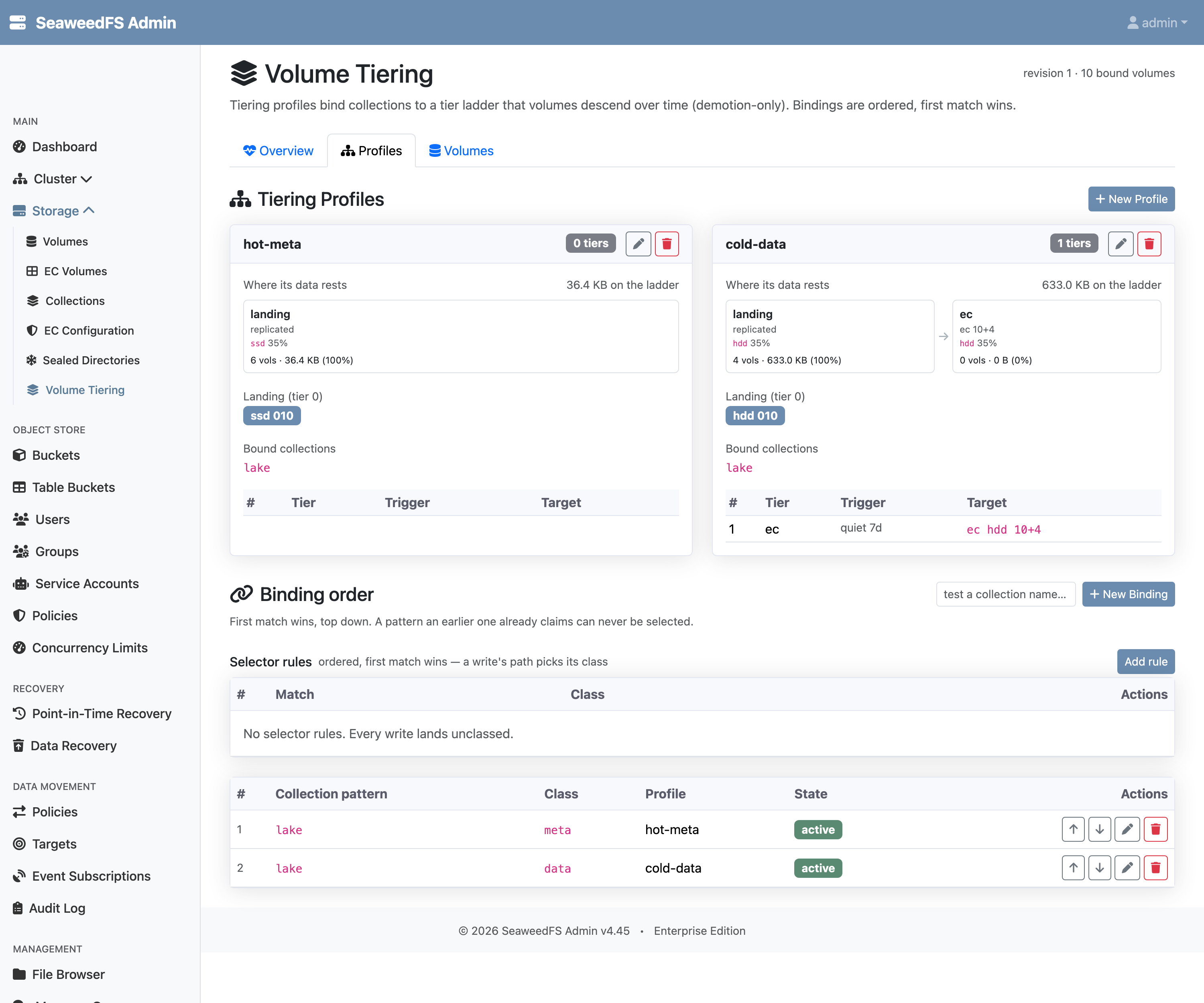
lake collection. From the first write, metadata/*.json and Avro manifests land on replicated SSD; Parquet lands on HDD.The tailClass line closes tiering’s one leak for analytics: every query opens a Parquet file by reading its footer, and the footer would otherwise age onto cold storage with the body. The Cache Parquet Footers job pins each file’s last 64 KiB to the SSD class — this session it reported, unprompted, within a minute of the seed:
"outcome":"success","message":"cached 65536 bytes in class \"meta\""
Best practices: metadata never erasure-codes and never leaves fast media — raise its replication instead; data takes the full ladder; let the built-in selectors do the path-matching (they correctly classify traps like Delta checkpoints). The full reasoning is in the tiered table buckets walkthrough.
7. Spread the writes
One volume absorbs one write at a time, so ingest concurrency is decided by how many distinct disks the master spreads a collection’s writes over. Make it a policy, not an accident:
$ weed shell> volume.concurrency -collection lake -minDisks 4
default 1 (no obligation)
  lake 4
default max concurrent volumes 0 (unbounded)
no per-collection overrides
minDisks is a floor on intent — with fewer eligible disks the write still succeeds and the shortfall drives growth. Its counterpart, -maxLiveVolumes, bounds how many volumes a quiet collection writes at once, so a cluster-wide floor doesn’t smear low-traffic collections across many barely-filling volumes. Details in Write Concurrency.
8. Erasure coding for the cold majority
The tiering profile above already declares it: data quiet for a week becomes 10+4 erasure-coded shards — ~1.4× raw storage for the durability of triple replication, the right trade for write-once columnar files. The volume_tiering worker applies it on schedule; here we run the same transition immediately to show the result:
volume 14: all 2 replicas are consistent (file count: 3)
generateEcShards 14 (collection "lake") on 127.0.0.1:8582 ...
deleted volume 14 from 127.0.0.1:8582
deleted volume 14 from 127.0.0.1:8581
Successfully completed EC encoding for 1 volumes
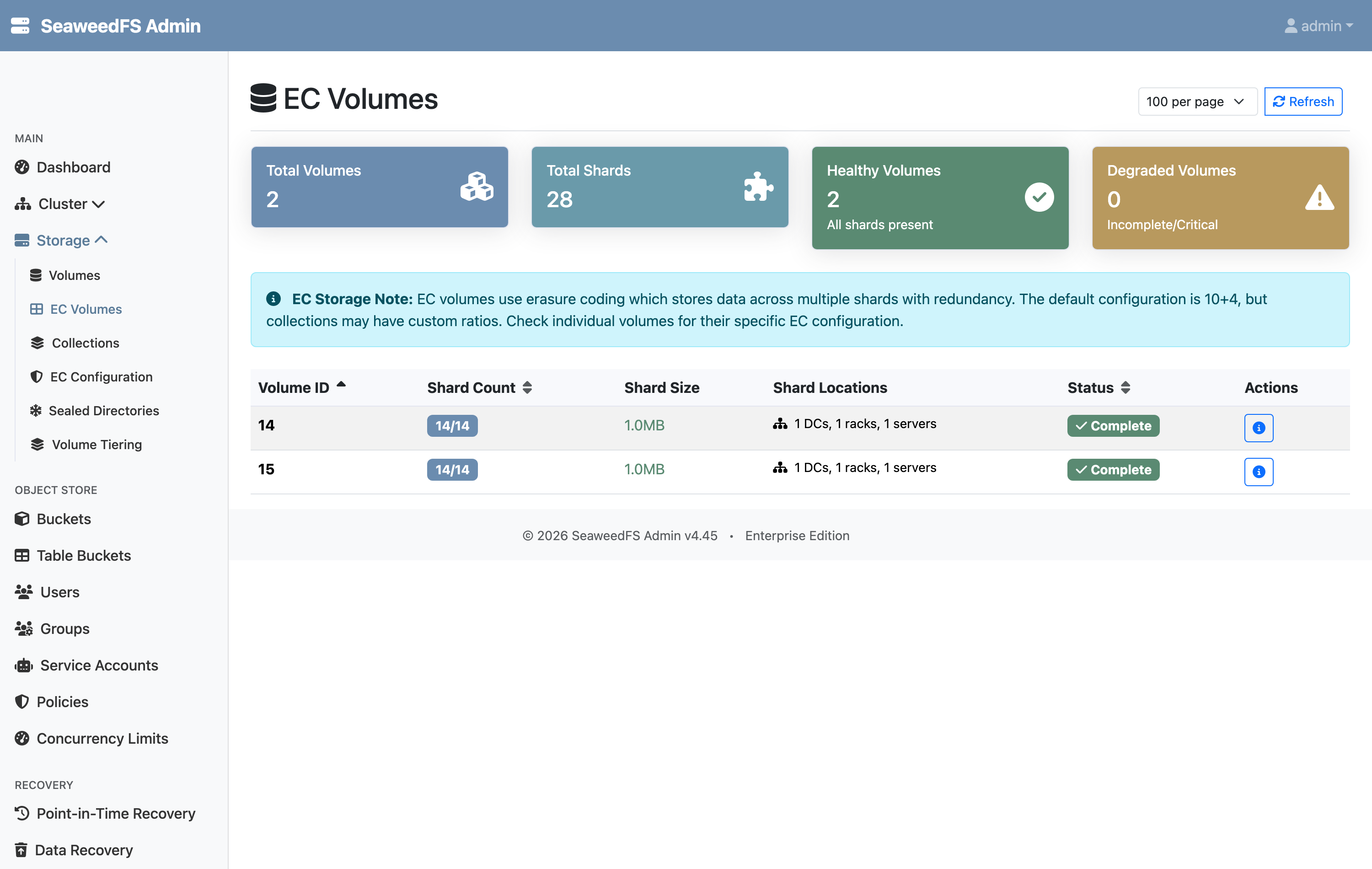
Best practices: let age move data to EC rather than encoding eagerly — replicated volumes are cheaper to write and vacuum; spread shards across as many servers/racks as you have (our single-box demo keeps them local with -rebalance=false; in production the default rebalance spreads them); size -volumeSizeLimitMB so an EC unit is meaningful but not unwieldy.
9. QoS: keep ETL from starving BI
Multi-tenant warehouses die by noisy neighbor. S3 concurrency limits put ceilings on scopes — per bucket, per access key, per account — plus a per-gateway crash guard. All of it is one API call (or the Admin UI) away:
curl -X POST admin:23646/api/s3/concurrency/settings \
  -d '{"enabled":true,"perGatewayMaxRequests":512,"perGatewayMB":256}'
curl -X POST admin:23646/api/s3/concurrency/scope \
  -d '{"kind":"bucket","id":"lake","enabled":true,
       "limits":[{"class":"Read","max":256},{"class":"Write","max":64},{"class":"List","max":16}]}'
curl -X POST admin:23646/api/s3/concurrency/scope \
  -d '{"kind":"accessKey","id":"warehouse_key","enabled":true,"limits":[{"class":"Write","max":32}]}'
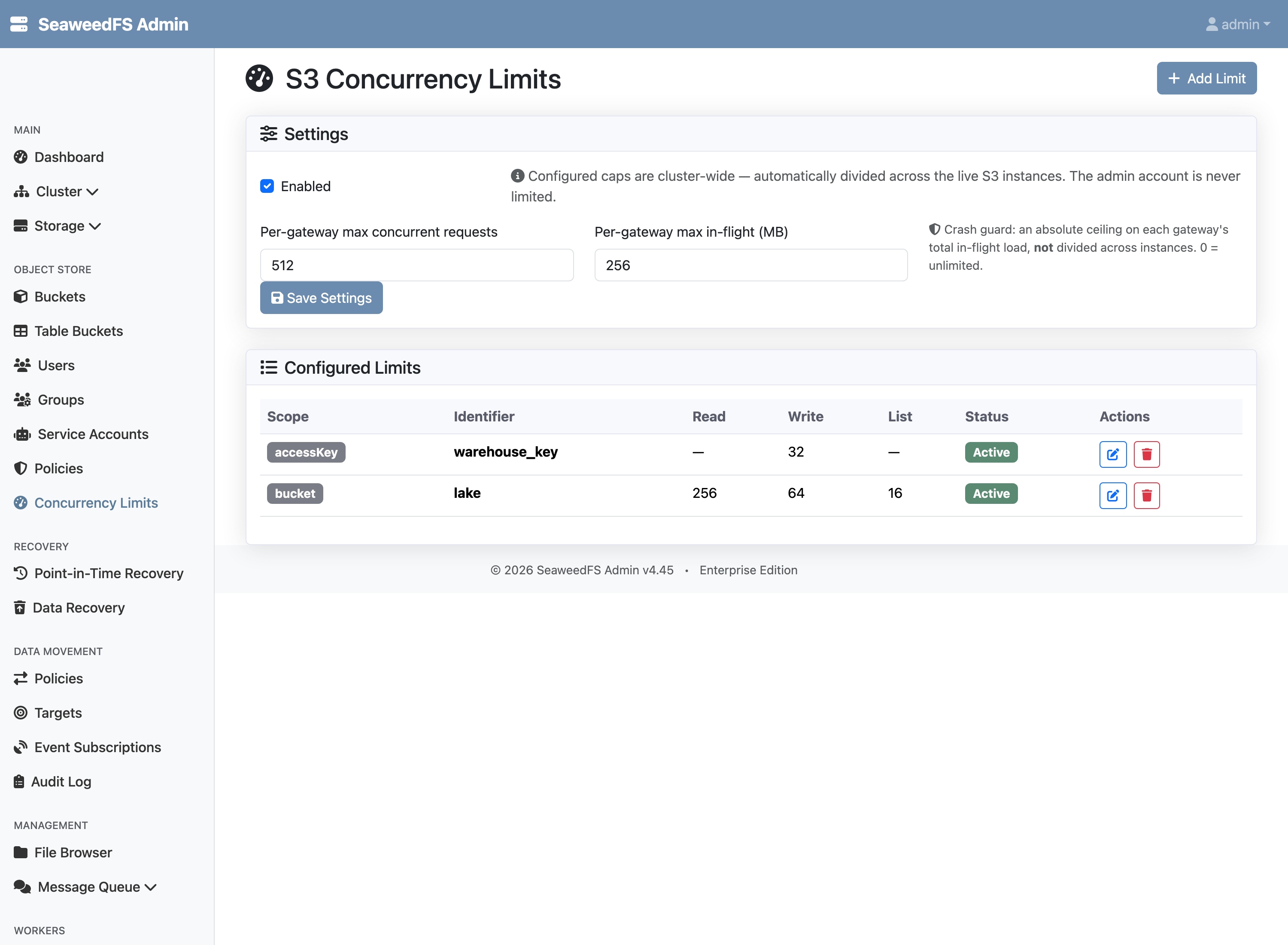
Best practices: bound Write and List per bucket before you need to; give each pipeline its own access key so its ceiling is its own; leave the per-gateway crash guard on as the backstop that survives any scope misconfiguration.
10. Metrics from every tier
Every component takes -metricsPort and exposes Prometheus metrics — no sidecars. Real series from this cluster, seconds after the seed:
SeaweedFS_build_info{version="4.45-enterprise",...} 1
SeaweedFS_s3_bucket_traffic_sent_bytes_total{bucket="lake"} 26
SeaweedFS_s3_in_flight_requests{type="GET"} 0
SeaweedFS_s3_in_flight_upload_bytes 0
Scrape them all:
scrape_configs:
  - job_name: seaweedfs
    static_configs:
      - targets: ["master1:9121","vol1:9122","vol2:9123","filer1:9124","s3a:9125","s3b:9126"]
Best practices: watch per-bucket S3 traffic and in-flight gauges (your QoS ceilings in action), master assignment latency, and volume-server disk fullness; the Admin UI dashboard covers the same ground interactively, but alerts belong in Prometheus. With seaweed-up’s monitoring block this whole stack — node_exporter everywhere, Prometheus, Grafana with the bundled SeaweedFS dashboard — is deployed for you.
11. Scaling out — live
The two axes are independent, and both are just “start another process.”
More access: a third gateway joins mid-session and serves the namespace on its first request — nothing to warm, nothing to rebalance, because gateways are stateless:
weed s3 -filer=filer1:8688,filer2:8689 -port=8435 -config=s3.json
gw 8435: metadata/v3.metadata.json # first request after start
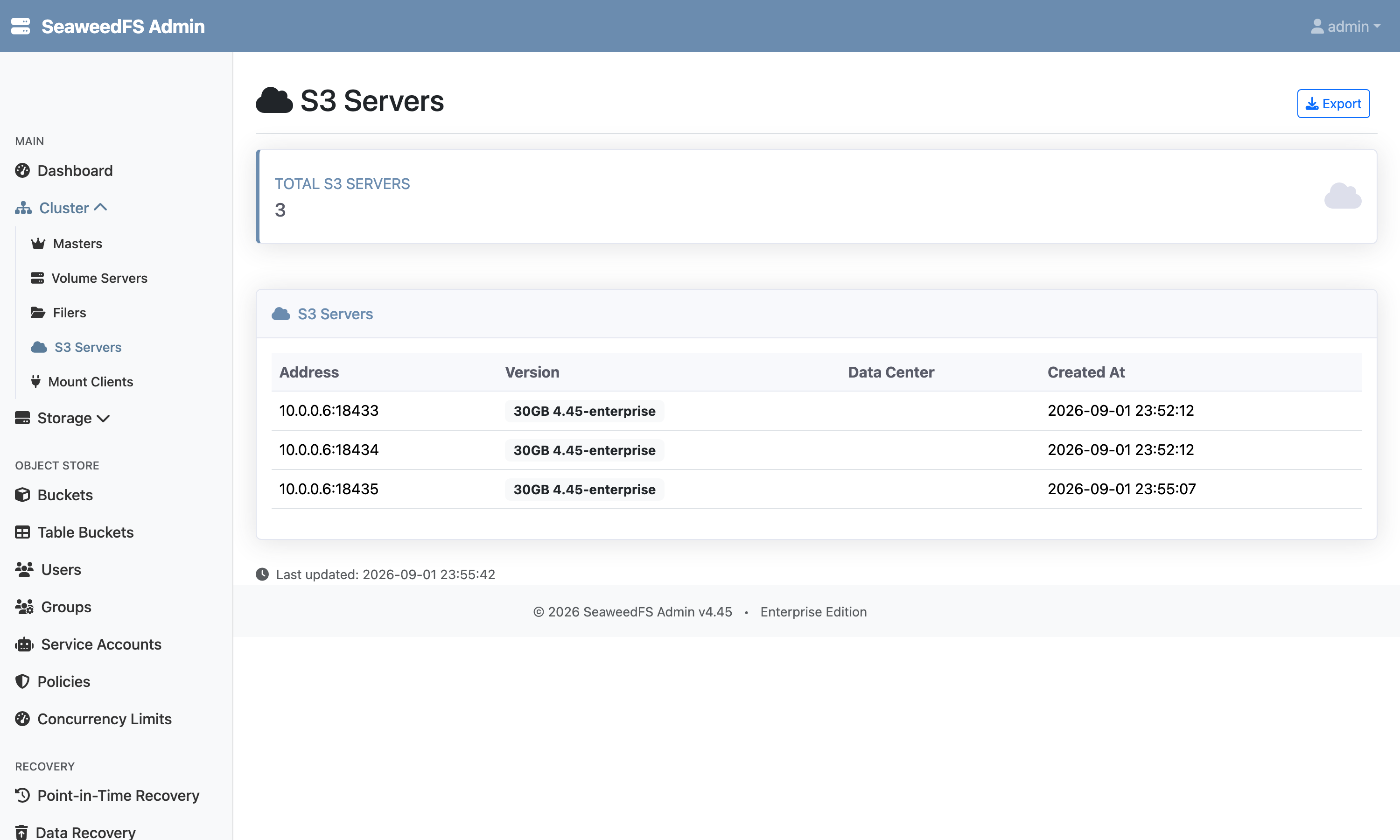
More capacity: a fifth volume server joins with three empty disks and the cluster’s capacity grows the moment its first heartbeat lands. New volumes grow onto it as collections need them; the balancer can spread existing ones.
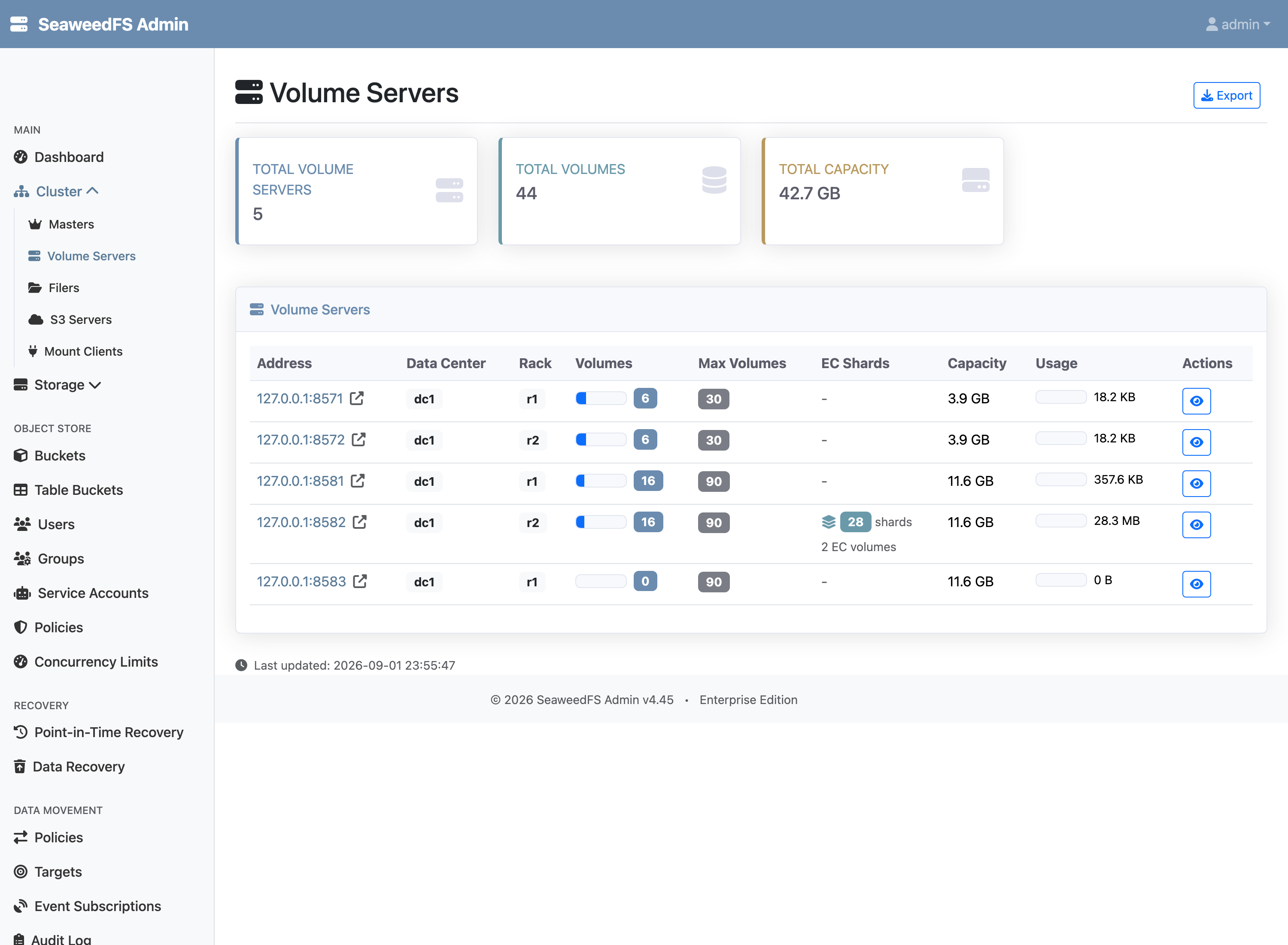
This is the shape of SeaweedFS scaling: gateways share nothing and stream data straight to volume servers, filers serve only metadata, volume servers own their disks, and the masters do only assignment — so each axis grows by adding machines to that tier, without touching the others. Day-2, that is one line in the YAML and seaweed-up cluster scale; upgrades roll through the same file.
The checklist
- Deploy with seaweed-up: the whole topology is one YAML file;
--enterpriseselects the build the policy layer needs; upgrades and scale-out roll through it. - Masters: three, raft,
-volumeSizeLimitMBand-defaultReplicationdecided up front. - Filers: at least two, every gateway configured with the full comma-separated list; data never flows through them.
- Replication matches racks:
010across racks; never a code your topology cannot place. - Disks are
-direntries, tiers are-disktags: one entry per physical disk,ssd/hddper medium. - Tiering policy on day one: metadata → replicated SSD forever; data → HDD → EC by age;
tailClassfor Parquet footers. - Write spread:
volume.concurrency -minDisksfor ingest-heavy collections;-maxLiveVolumesto keep quiet ones tidy. - QoS before the incident: per-bucket and per-key ceilings, per-gateway crash guard.
- Metrics everywhere:
-metricsPorton every process, scraped centrally. - Management plane: one admin with a durable
-dataDir; workers scale by job type, with real disk under-workingDir. - Scale by tier: gateways for access, volume servers for capacity, masters untouched.
Sources: every command, output, and screenshot above is a capture from one live session on SeaweedFS 4.45. Volume tiering, the footer cache, QoS scopes, and write concurrency are SeaweedFS Enterprise; the seaweed-up examples are from its repository.
Related: Volume Tiering · Erasure Coding · S3 Concurrency Limits · Write Concurrency · S3 Table Buckets · Tiered table buckets walkthrough