Distributed storage is very good at surviving hardware. Replication and erasure coding shrug off dead disks and lost racks — but they offer zero protection against the actual leading cause of data loss: somebody (or something) changing the wrong data. A fat-fingered rm -rf, a lifecycle rule matching more than intended, an ETL job writing corrupt output over good files, and — increasingly — an AI agent editing or deleting at machine speed. The cluster doesn’t resist any of it; it faithfully replicates the mistake to three copies.
SeaweedFS Enterprise ships two features that give a cluster a working undo button, both powered by the same retention window:
- Data Recovery answers “show me everything that was deleted — and bring it back.”
- Point-in-Time Recovery answers “make this prefix look exactly the way it did at 14:01:59” — reverting overwrites and renames, not just deletes.
This post walks through both from the Admin UI, then compares them with how the rest of the storage world handles the same problem.
One window, every second a restore point
Both features hang off a single master flag:
weed server -master.deletionRetention=72h
Inside that window, deleted and overwritten bytes stay on disk (garbage collection is deferred), and the filer’s metadata change log remembers every create, delete, rename, and overwrite. That combination makes any second in the window a restore point — which is a different shape of safety net than the one most systems offer:
There’s nothing to schedule, no snapshot quota to manage, and nothing to pre-provision per directory or per bucket. If retention was on when the mistake happened, the way back exists.
Anatomy of a bad afternoon
To show both tools working, we staged a realistic incident on a test cluster: a quarterly-reports bucket where a broken ETL run overwrote three files with corrupt output, and its cleanup step deleted four more. Classic compound damage — some files gone, some files present-but-wrong.
Step 1: what was deleted? Open Recovery → Data Recovery, scan, and filter by prefix, glob, owner, or time. Every recoverable deletion in the window is listed with a one-click restore (or select many and batch-restore, choosing what happens on conflicts):
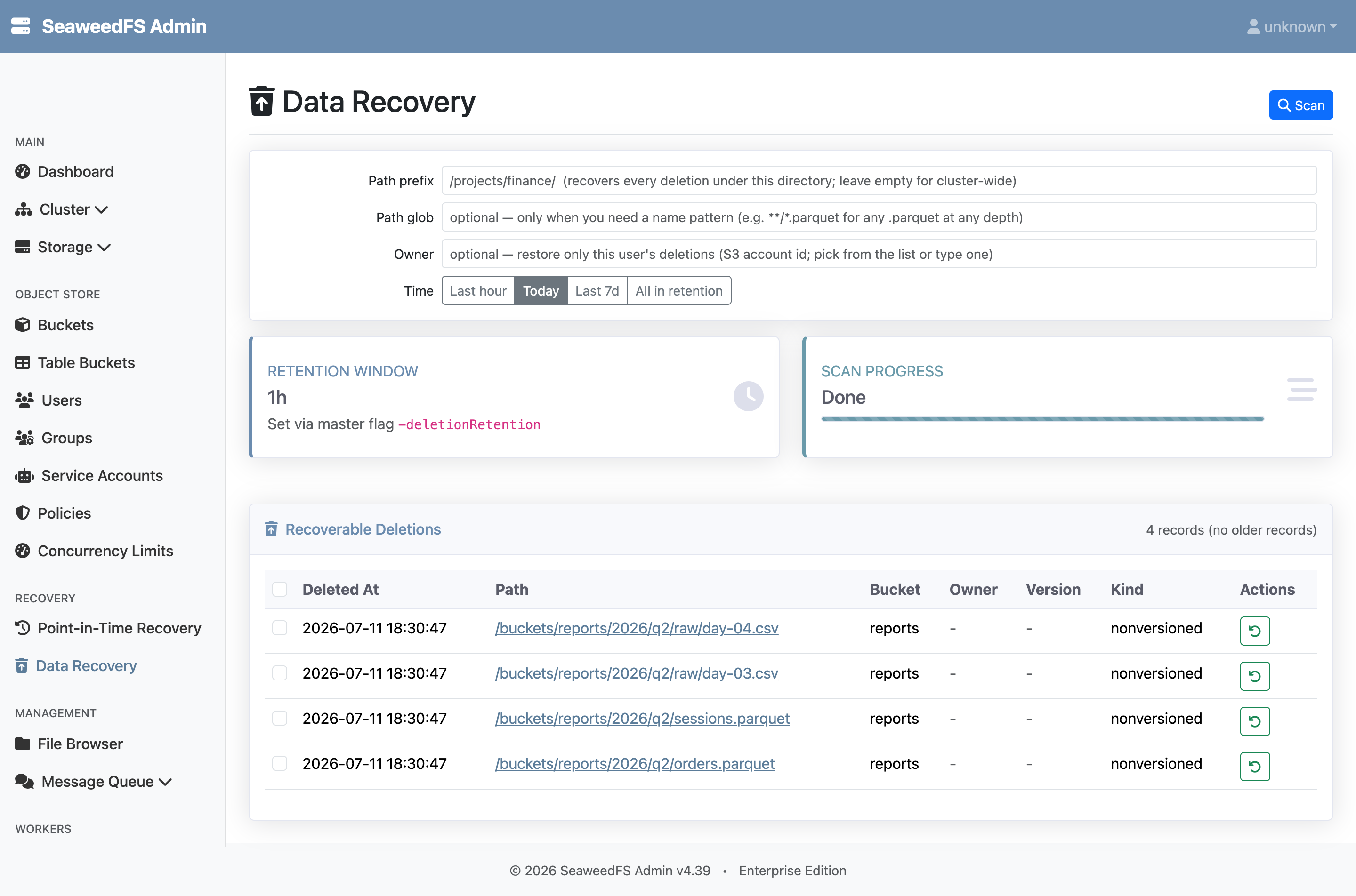
That fixes the deletes — but not the three files the job overwrote. They still exist, so no delete-oriented tool will ever flag them. That’s what PITR is for.
Step 2: rewind the prefix. Open Recovery → Point-in-Time Recovery, enter the scope and the moment just before the job ran, and click Compute plan. PITR replays the filer’s change log and shows exactly what it would do — here, revert: 3, restore: 4 — before doing anything:
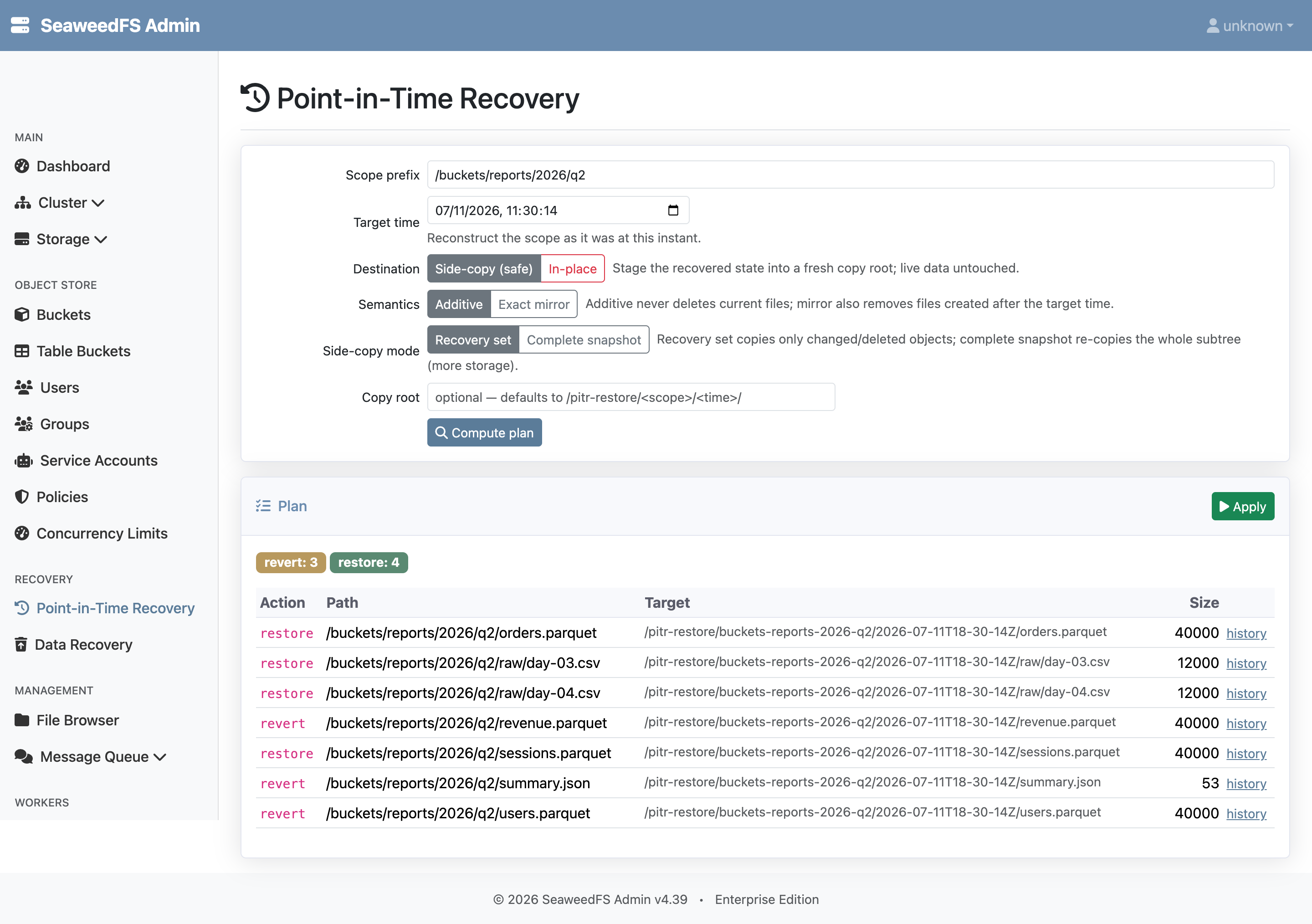
The defaults are deliberately paranoid. Side-copy stages the recovered state into a fresh location and never touches live data; additive only brings back what was lost and never deletes a current file. Flip to in-place and exact mirror when you want a true rollback — an in-place apply requires a typed confirmation bound to the exact plan you previewed. And from any plan row, a history link opens that object’s full version timeline in the window, so you can restore a single earlier version instead of a whole subtree.
How the rest of the world handles this
Rolling back mistakes is an old problem, and every storage system has an answer. The answers cluster into three families — each with a structural catch.
Snapshots (ZFS, NetApp, CephFS, Qumulo, HDFS) protect only the moments someone scheduled: with hourly snapshots, ZFS guidance cheerfully accepts losing “a maximum of one hour’s work”. Tightening the schedule collides with count ceilings (1,023 per NetApp volume, ~99 per CephFS directory). And actually rolling back is either destructive or absent: NetApp’s SnapRestore reverts a volume in seconds but irrecoverably deletes everything newer — including later snapshots; ZFS rollback likewise discards all newer data; CephFS has no rollback at all — the maintainers’ suggestion is manually rsyncing out of the .snap directory; Qumulo restores by copying files back out too.
Object versioning (S3, MinIO) keeps every version, but each is billed as a full object, and recovery is per-object surgery — remove this delete marker, copy that version back — with no folder-level undo. The closest thing to namespace PITR is AWS Backup’s continuous backup for S3: genuinely second-level precision, but with a hard 35-day cap, no ability to restore the most recent 15 minutes, item-level restores capped at 5 objects per job — and it only works if you set up versioning plus a backup plan before the mistake.
Continuous data protection (Zerto, Veeam CDP) delivers real any-point-in-time recovery — for VM disk images. Rewinding a virtual disk is the wrong tool when the damage is three objects inside one prefix of a shared namespace. Databases (RDS, Aurora, DynamoDB) have done log-replay PITR for years; it’s the same architecture SeaweedFS uses — a change log replayed to a moment — applied to a file and object namespace instead of tables.
| Approach | Restore points | Rollback of a subtree | Must be set up in advance? |
|---|---|---|---|
| ZFS / NetApp / CephFS / Qumulo snapshots | Scheduled instants only | Destructive (loses newer data), or copy-out only | Yes — schedules + quotas |
| S3 / MinIO versioning | Per-object versions | No folder-level undo | Yes — versioning on, full-copy cost |
| AWS Backup for S3 | Any second, ≤35 days, minus last 15 min | Non-destructive copy only, 5-object item cap | Yes — versioning + backup plan |
| VM-level CDP (Zerto, Veeam) | Any point, days of journal | Whole disks/VMs, not namespaces | Yes — per-VM journals |
| SeaweedFS Data Recovery + PITR | Any second in the retention window | Previewed plan → side-copy or in-place | One master flag |
Two things in that last row don’t exist elsewhere in the file/object world, as far as we can find. Nobody else offers a previewed, per-path plan — see exact counts and destinations, stage to a safe copy, then apply — before a rollback touches anything. And nobody else makes undelete work with no pre-provisioning beyond a flag: no snapshot schedule, no versioning conversion, no backup plan that had to exist yesterday.
Turning it on, and what to keep in mind
Set the window, and both features light up in the Admin UI under Recovery — that’s the whole setup:
weed server -master.deletionRetention=72h
A few honest notes from the docs worth repeating:
- The window is the boundary. Deletes and overwrites older than the retention window are gone for good — this is an undo button, not an archive. Size it to how fast your team notices mistakes.
- Retention holds space. Deferred garbage collection keeps deleted bytes on disk for the window; a 72h window means up to 72h of churn stays allocated.
- It complements backups — it doesn’t replace them. Off-cluster backups, replication, and Object Lock still cover fires, ransomware, and compliance. This covers the 3 p.m. “oh no” without touching any of them.
- The free 25 TB trial caps the window at 1 hour; a full license unlocks longer windows.
Wrapping up
Hardware durability was solved a decade ago; human (and now agent) durability wasn’t. A continuous retention window turns the most common storage incidents — wrong delete, bad overwrite, runaway job — from restore-from-backup afternoons into a two-minute Admin UI errand: scan, preview the plan, apply.
Read the Data Recovery and Point-in-Time Recovery feature pages, their technical references (recovery internals, PITR internals), or get started — SeaweedFS Enterprise is free for development and testing under 25TB.