walgit is a git server that is one binary in front of an object store. Point it at a bucket and you get smart-HTTP fetch/push, LFS, a browsing web UI, and a JSON API — with no database, no leader, and no local state that matters. Every machine running walgit is a disposable cache; the bucket is the repository. It’s a Rust implementation of the architecture Cursor described in Git at any scale.
The repository lives in the bucket as an immutable write-ahead log: a tiny manifest.pb (the head sequence and live pack set), append-only log/<seq>.pb entries, and content-addressed wal/<sha>.pack files. A push uploads its objects, then rewrites manifest.pb with a compare-and-swap — that CAS is the consensus. No election, no quorum: two racing pushes cannot both win, and any replica that reads the manifest has the repository.
That design needs one thing from the store: an atomic compare-and-swap on an object (conditional PUT). SeaweedFS’s S3 gateway supports conditional writes — If-None-Match and If-Match preconditions — so walgit’s commit point works on it directly. Running SeaweedFS next to your walgit servers keeps every push and clone at local-disk latency; and because the repository is just objects in a bucket, you can make cloud S3 the durable home and run SeaweedFS as a low-latency cache in front of it — reads served from the cache, writes synced back, a lost cache node just re-mounted. This post runs the whole thing end to end on one machine; every command and output block is a real capture.
Step 1 — Start SeaweedFS with a bucket for walgit
Give walgit a bucket and a scoped S3 identity. Save this as walgit-s3.json:
{
  "identities": [
    {
      "name": "walgit",
      "credentials": [
        { "accessKey": "walgitkey", "secretKey": "walgitsecret1234567890" }
      ],
      "actions": ["Read:walgit", "Write:walgit", "List:walgit", "Tagging:walgit"]
    }
  ]
}
Start SeaweedFS with weed mini, pre-creating the walgit bucket and serving S3 on :8333:
weed mini -dir=./data -s3.config=walgit-s3.json -bucket=walgit
Step 2 — Build walgit
walgit has no prebuilt releases yet, so build the server binary from source. You need Rust (per its rust-toolchain.toml, 1.97 here), protoc, and Node + pnpm for the embedded web UI:
git clone https://github.com/tobi/walgit.git && cd walgit
corepack enable                                   # provides pnpm
(cd web && pnpm install --frozen-lockfile && pnpm run build)   # the React UI
cargo build --release --bin walgit-server
That produces ./target/release/walgit-server. (There’s also a Containerfile and a Nix flake if you’d rather not build the toolchain yourself.)
Step 3 — Point walgit at SeaweedFS
walgit’s store config is where SeaweedFS goes. Save this as walgit.toml — the two keys that matter for a self-hosted S3 are endpoint and force_path_style = true:
[server]
listen = "127.0.0.1:8080"
public_url = "http://127.0.0.1:8080"
auto_create_on_push = true          # git push to a new name creates the repo

[server.tls]
mode = "off"                        # plain HTTP for a local walkthrough

[server.auth]
mode = "none"                       # loopback: everyone is anon with write

[store]
backend = "s3"
bucket = "walgit"

[store.s3]
endpoint = "http://127.0.0.1:8333"  # the SeaweedFS S3 gateway
region = "us-east-1"
access_key_env = "AWS_ACCESS_KEY_ID"
secret_key_env = "AWS_SECRET_ACCESS_KEY"
force_path_style = true             # required for SeaweedFS

[cache]
dir = "/tmp/walgit-cache"
walgit reads the credentials from the environment. Start it:
AWS_ACCESS_KEY_ID=walgitkey AWS_SECRET_ACCESS_KEY=walgitsecret1234567890 \
  ./target/release/walgit-server --config walgit.toml
INFO walgit_cli::serve: opening store, backend: S3
INFO walgit_cli::serve: store ready, backend: "s3"
INFO walgit_server: walgit-server listening, addr: 127.0.0.1:8080, tls: false, url: http://127.0.0.1:8080
It connected to SeaweedFS and is serving. Leave it running.
Step 4 — Use it
A push to a name that doesn’t exist creates the repository (auto_create_on_push). Make a local project and push it:
mkdir app && cd app && git init -q -b main
echo "# Hello, SeaweedFS" > README.md
echo 'print("hello from walgit on seaweedfs")' > main.py
git add -A && git commit -qm "initial commit"
git remote add origin http://127.0.0.1:8080/acme/hello.git
git push -u origin main
remote: * walgit: acme/hello — push by anon
To http://127.0.0.1:8080/acme/hello.git
 * [new branch]      main -> main
Clone it back into a fresh directory — served straight from the bucket:
git clone http://127.0.0.1:8080/acme/hello.git cloned
Cloning into 'cloned'...
ls cloned # README.md main.py
A second commit and push exercises the part that makes walgit interesting — the manifest compare-and-swap:
cd cloned && echo "print('second commit')" >> main.py
git commit -qam "add a line" && git push origin main
remote: * walgit: acme/hello — push by anon
To http://127.0.0.1:8080/acme/hello.git
   f07b188..e800314  main -> main
That fast-forward went through by re-reading manifest.pb, validating the ref’s old value, and CAS-writing the new one — the round-trip SeaweedFS’s conditional writes make atomic. git ls-remote confirms the tip:
e80031409ce9c432589b50e121bfe2abc5d5df4e	refs/heads/main
e80031409ce9c432589b50e121bfe2abc5d5df4e	HEAD
The repository is a WAL in the bucket
Nothing about this is opaque — list the bucket and you see the write-ahead log itself. Two pushes produced two log entries, two content-addressed packs, and one manifest:
     256  repos/acme/hello/manifest.pb                 ← the CAS commit point
     290  repos/acme/hello/log/0000000000000001.pb     ← push 1 (immutable)
     332  repos/acme/hello/log/0000000000000002.pb     ← push 2 (immutable)
     321  repos/acme/hello/wal/03a032e4….pack          ← push 1's objects
    1156  repos/acme/hello/wal/03a032e4….idx
     306  repos/acme/hello/wal/f34df035….pack          ← push 2's objects
    1184  repos/acme/hello/wal/f34df035….idx
Only manifest.pb is ever overwritten; everything else is immutable and content-addressed. Run a second walgit anywhere pointed at this bucket and it serves the same repository — it reads the manifest and it’s there.
The web UI
walgit serves a browsing UI from the same binary. The repository, rendered from the objects in SeaweedFS:
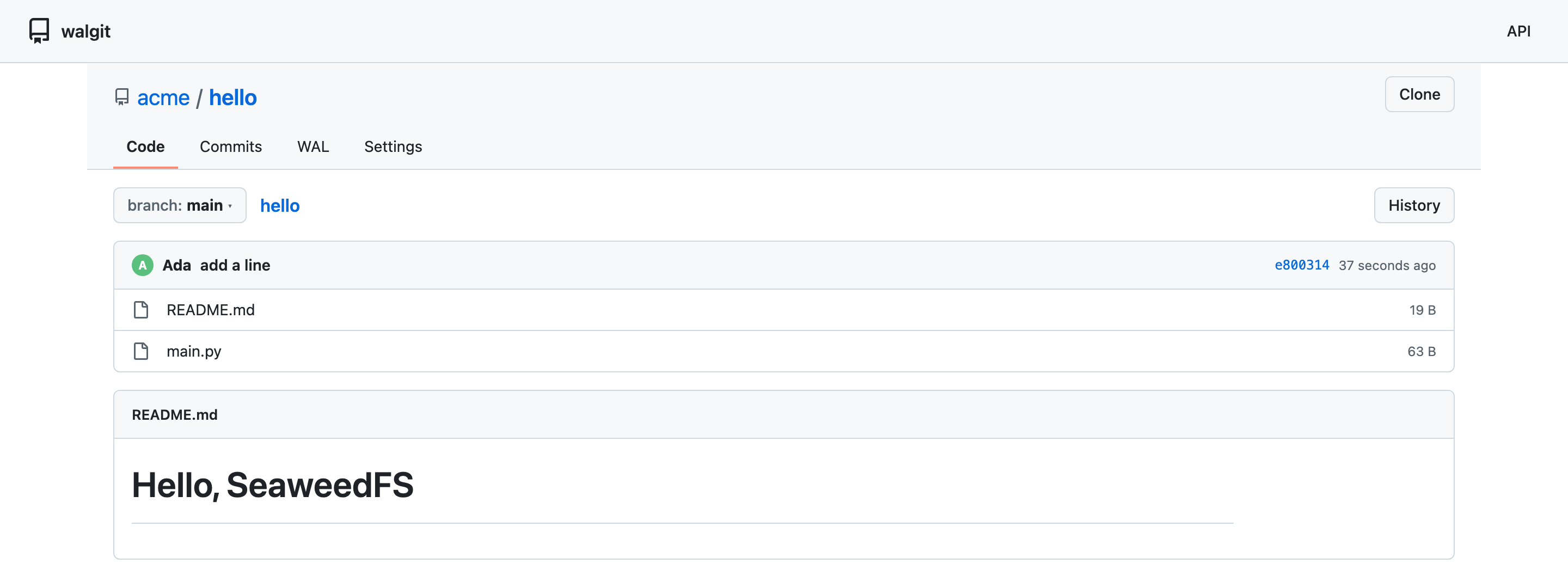
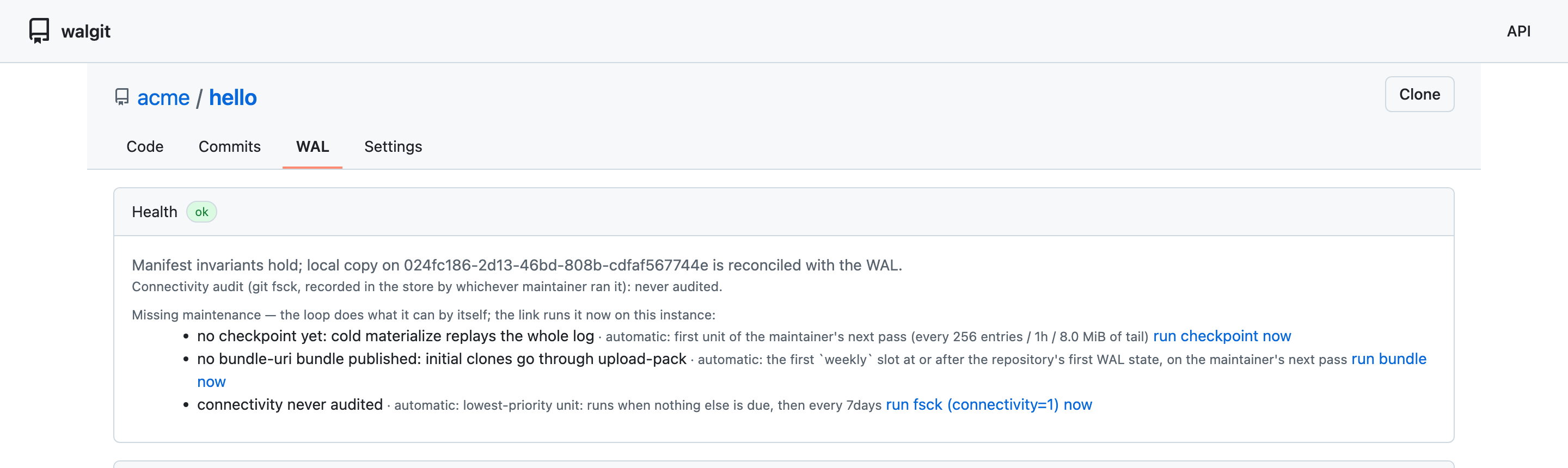
acme/hello repository in walgit's web UI — files and the rendered README, served from the SeaweedFS bucket.walgit also exposes its own WAL: a health page that shows the manifest invariants hold and this instance’s local copy is reconciled with the log in the bucket.
Cloud S3 as the durable home
Steps 1–4 ran walgit on a single local SeaweedFS. For production, the cleanest shape is to make cloud S3 the durable home and run SeaweedFS as a low-latency cache in front of it — set up once, up front. You remote.mount the SeaweedFS bucket onto the S3 bucket and run filer.remote.sync for write-back: reads are served from the nearby cache (filling from S3 on a miss), and every write is synced back to S3. S3 is authoritative from the first push; the SeaweedFS cache is disposable.
Configure the remote and mount the bucket onto it (from weed shell):
remote.configure -name cloud -type s3 \
  -s3.access_key <KEY> -s3.secret_key <SECRET> \
  -s3.region us-east-1 -s3.endpoint https://s3.us-east-1.amazonaws.com
remote.mount -dir=/buckets/walgit -remote=cloud/my-walgit
Then run the write-back sync so local writes land in S3:
weed filer.remote.sync -dir=/buckets/walgit
Point walgit at this SeaweedFS. Each push now writes through the cache to S3 — push a repo (here, team/proj) and the cloud bucket holds the whole write-ahead log, object for object:
repos/team/proj/  (on cloud S3)
  manifest.pb
  log/0000000000000001.pb
  log/0000000000000002.pb
  wal/03bd118c….pack   wal/03bd118c….idx
  wal/6744101e….pack   wal/6744101e….idx
Recovery is a re-mount, not a restore. Because S3 is the home, losing a SeaweedFS cache costs nothing: start a fresh one, remote.mount it onto the same bucket, remote.meta.sync -dir=/buckets/walgit, and walgit serves again — reads fill from S3, and remote.cache materializes them locally if you want. (You can even skip SeaweedFS for recovery: walgit is stateless, so pointing it straight at the S3 bucket serves the repositories too.)
In this walkthrough the “cloud S3” was a second SeaweedFS instance standing in for AWS, so the listing above is a real capture — walgit pushed through the cache,
filer.remote.syncwrote every object back, and a fresh cache re-mounted onto the bucket served the repo. The configuration is identical for real AWS S3: use-s3.endpoint https://s3.<region>.amazonaws.com(or omit-s3.endpointand set only-s3.region), and drop-s3.force_path_style, which self-hosted S3 endpoints need but AWS does not.
Which setup?
All three shapes keep the repository in object storage — they differ only in whether SeaweedFS is the authoritative store, a cache in front of one, or absent. Amber marks the durable copy.
- 1 · Primary + backup — walgit on a local SeaweedFS that owns the data (protected by SeaweedFS replication/EC);
filer.remote.syncmirrors it to cloud S3 for off-site DR. Best when SeaweedFS is your storage platform and you want full local performance. Recovery is a restore. - 2 · Cache gateway — cloud S3 is the durable home; SeaweedFS is a low-latency cache
remote.mounted in front of it (the setup above). Best when S3 is your system of record and you want cheap durability, easy multi-region caches, and re-mount-to-recover. - 3 · Direct on S3 — walgit straight on the bucket, no SeaweedFS. Simplest, but every store operation pays S3 latency. Handy for recovery, since walgit is stateless.
Shapes 1 and 2 use the same three commands (remote.configure / remote.mount / filer.remote.sync) — the only difference is whether S3 is a backup or the home, i.e. whether you mount from the start.
Why SeaweedFS is a good home for it
- S3 is the durable home; the cache is disposable. Run SeaweedFS as a
remote.mountcache in front of cloud S3: walgit serves at local-disk latency, writes sync back to S3, and losing a cache node means re-mounting a fresh one — no restore. (Or run SeaweedFS as the primary and back it up to S3; either way, the data’s home is object storage.) - The CAS commit point just works. walgit’s whole consistency model rests on an atomic conditional PUT; SeaweedFS’s conditional writes provide exactly that, so pushes are safe even with several walgit instances pointed at one bucket.
- Stateless, disposable servers. walgit hosts hold nothing that matters — scale them out or kill them, and the repositories are untouched in SeaweedFS. One S3 endpoint backs your data lake, your backups, and now your git hosting.
walgit is an independent open-source project by Tobias Lütke; this post configures it to run on SeaweedFS. Background reading: Cursor’s Git at any scale.