The kernel mount makes a SeaweedFS cluster look like a local filesystem — a real mount -t seaweedvfs, not FUSE. This post walks through setting it up from scratch on an empty server, with nothing pre-installed and nothing hand-waved: every command below was run on a small Debian 13 VM (2 vCPUs, 8 GB RAM), and every output block is a real, unedited capture from that session (trimmed only where marked with …).
By the end, the box will have:
- the
seaweedvfskernel module, built by DKMS for the running kernel, - a mounted SeaweedFS namespace at
/mnt/seaweed, - SQLite and a C compiler running against it like a local disk,
- and the same namespace re-exported over NFSv4 using the stock Linux kernel NFS server.
weed server -filer on the same box — point the mount at your real filer instead.One note before we start: the kernel client is an enterprise feature — its daemon requires a filer running the SeaweedFS Enterprise binary (the free 25 TB trial works). Our demo cluster is exactly that, started with one command:
$ weed server -dir=/data/seaweed -ip=10.0.0.6 -filer
The even easier option for a dev box is weed mini, which starts the whole stack — master, volume, filer, S3, and the Admin UI — in one process, with everything auto-tuned for small setups:
$ weed mini -dir=/data/seaweed -ip=10.0.0.6
Either way you get a filer at 10.0.0.6:8888 (HTTP) and 10.0.0.6:18888 (gRPC — always HTTP port + 10000). The gRPC address is what the mount will use.
Step 1 — the starting point
A stock Debian 13 box. No SeaweedFS client bits anywhere:
$ uname -rm
6.12.90+deb13.1-amd64 x86_64

$ head -2 /etc/os-release
PRETTY_NAME="Debian GNU/Linux 13 (trixie)"
NAME="Debian GNU/Linux"

$ sudo modinfo seaweedvfs
modinfo: ERROR: Module seaweedvfs not found.

$ command -v sw-kd || echo "sw-kd: not installed"
sw-kd: not installed
Step 2 — install the module and the daemon
One command. It detects the package manager, architecture, and kernel, installs the DKMS module source plus the sw-kd daemon from the latest release, and builds the module for the exact running kernel:
$ curl -fsSL https://raw.githubusercontent.com/seaweedfs/artifactory/main/seaweed-vfs/install.sh | sudo bash
The real output, trimmed of apt chatter:
>> latest release: vfs-0.1.5
>> installing DKMS prerequisites (toolchain + kernel headers for 6.12.90+deb13.1-amd64)
>> packages from https://github.com/seaweedfs/artifactory/releases/download/vfs-0.1.5
…
The following NEW packages will be installed:
  seaweedfs-vfs seaweedfs-vfs-dkms
…
Setting up seaweedfs-vfs (0.1.5) ...
seaweedfs-vfs installed. The filer is selected at mount time — nothing to
configure first:

  mkdir -p /mnt/seaweed
  mount -t seaweedvfs HOST:18888 /mnt/seaweed       # starts seaweed-vfs@HOST:18888

Setting up seaweedfs-vfs-dkms (0.1.5) ...
Building module(s)...... done.
Signing module /var/lib/dkms/seaweedfs-vfs/0.1.5/build/seaweedvfs.ko
Installing /lib/modules/6.12.90+deb13.1-amd64/updates/dkms/seaweedvfs.ko.xz
Running depmod...... done.
>> seaweedvfs module v0.1.5 ready for 6.12.90+deb13.1-amd64
>> done.
Two packages landed: the module source (rebuilt automatically by DKMS on every kernel upgrade) and the daemon. Verify:
$ sudo dkms status
seaweedfs-vfs/0.1.5, 6.12.90+deb13.1-amd64, x86_64: installed

$ sudo modinfo seaweedvfs | head -5
filename:       /lib/modules/6.12.90+deb13.1-amd64/updates/dkms/seaweedvfs.ko.xz
version:        0.1.5
description:    SeaweedFS kernel VFS client
author:         SeaweedFS
license:        GPL

$ dpkg -l | grep seaweedfs-vfs
ii seaweedfs-vfs 0.1.5 amd64
ii seaweedfs-vfs-dkms 0.1.5 all
Note there was no filer to configure — the filer is chosen at mount time, so one box can mount several clusters side by side. Pinned-kernel fleets with no compiler can install a precompiled .ko instead (operations reference).
Step 3 — mount it
$ sudo mkdir -p /mnt/seaweed
$ sudo mount -t seaweedvfs 10.0.0.6:18888 /mnt/seaweed
The mount helper loads the module, starts a per-filer daemon instance, waits for it to attach, and mounts. All of that is inspectable:
$ mount | grep seaweedvfs
none on /mnt/seaweed type seaweedvfs (rw,relatime)

$ df -h /mnt/seaweed
Filesystem      Size  Used Avail Use% Mounted on
none            2.5G     0  2.5G   0% /mnt/seaweed

$ lsmod | grep seaweedvfs
seaweedvfs             61440  2

$ systemctl status "[email protected]:18888.service" --no-pager
● [email protected]:18888.service - SeaweedFS kernel VFS daemon (sw-kd) for filer 10.0.0.6:18888
     Loaded: loaded (/usr/lib/systemd/system/[email protected]; disabled; preset: enabled)
     Active: active (running) since Sun 2026-07-12 20:00:22 UTC; 46s ago
    Process: 2292701 ExecStartPre=/sbin/modprobe seaweedvfs (code=exited, status=0/SUCCESS)
     Memory: 20.9M (peak: 21.4M)
        CPU: 34ms
     CGroup: /system.slice/system-seaweed\x2dvfs.slice/[email protected]:18888.service
             └─2292702 /usr/sbin/sw-kd --filer 10.0.0.6:18888
The whole client is a 61 KB kernel module and one daemon process at 21 MB of memory — but be precise about what that number is: it’s the idle footprint. Two different things drive the daemon’s memory, and only one of them is bounded by workload:
- File count: flat. The daemon keeps no per-inode map, so its metadata cost stays around 8 MB whether the cluster holds thousands of files or tens of millions — per-file caching happens in the kernel’s reclaimable dentry and page caches, not the daemon’s heap.
- I/O activity: bounded cache. Under sustained reads the daemon holds transfer buffers — a whole-chunk read cache that defaults to 256 MiB, plus memory glibc’s allocator retains across its arenas. During heavy streaming, expect a few hundred MB of RSS, not 21.
Both I/O knobs are tunable per filer. Create /etc/seaweedfs-vfs/10.0.0.6:18888.conf:
# cap the whole-chunk read cache (MiB; default 256, 0 disables):
EXTRA_ARGS=--chunk-cache-mb 64

# the unit reads this file as a systemd EnvironmentFile, so plain KEY=value
# lines become the daemon's environment — cap glibc's retained memory:
MALLOC_ARENA_MAX=2
…and restart the daemon (or remount) to apply. What can’t happen is the FUSE failure mode — an unbounded per-inode heap that grows with file count until the mount OOMs; the internals reference covers the memory model in detail.
Step 4 — first files
It behaves like a local filesystem, because to every application it is one:
$ echo "hello from the kernel mount" | sudo tee /mnt/seaweed/hello.txt
hello from the kernel mount

$ sudo mkdir -p /mnt/seaweed/backups && sudo rsync -a /etc/ssh/ /mnt/seaweed/backups/ssh/
$ ls -la /mnt/seaweed/
total 4
drwxr-xr-x 2 root root    0 Jul 12 20:00 .
drwxr-xr-x 9 root root 4096 Jun 26 07:16 ..
drwxr-xr-x 2 root root    0 Jul 12 20:01 backups
-rw-r--r-- 1 root root   28 Jul 12 20:01 hello.txt

$ diff -r /etc/ssh /mnt/seaweed/backups/ssh && echo "backup verified — identical"
backup verified — identical
And it’s the same namespace every other SeaweedFS surface sees. The filer’s HTTP API serves the file we just wrote:
$ curl -s http://10.0.0.6:8888/hello.txt
hello from the kernel mount
Step 5 — how it feels: the page cache at work
A quick feel for throughput, with a 512 MiB file of random bytes. (Small print: this is a 2-vCPU VM talking to a single-node cluster over loopback — read it as shape, not as a benchmark.)
$ sudo dd if=/tmp/sample.bin of=/mnt/seaweed/sample.bin bs=1M conv=fsync
536870912 bytes (537 MB, 512 MiB) copied, 1.57048 s, 342 MB/s

$ sha256sum /tmp/sample.bin /mnt/seaweed/sample.bin
0c8e24df58aa1b9ba4cda8c2186a173a25d595d267765b62dbb38e292e40bf0e  /tmp/sample.bin
0c8e24df58aa1b9ba4cda8c2186a173a25d595d267765b62dbb38e292e40bf0e  /mnt/seaweed/sample.bin
Now the part that makes a kernel filesystem different from a userspace one. Read the file cold, then read it again:
# cold read (page cache dropped first):
$ sudo sh -c "echo 3 > /proc/sys/vm/drop_caches"
$ dd if=/mnt/seaweed/sample.bin of=/dev/null bs=1M
536870912 bytes (537 MB, 512 MiB) copied, 1.07264 s, 501 MB/s

# read it again — served from the kernel page cache this time:
$ dd if=/mnt/seaweed/sample.bin of=/dev/null bs=1M
536870912 bytes (537 MB, 512 MiB) copied, 0.120026 s, 4.5 GB/s
The second read never left the kernel: 4.5 GB/s on a 2-vCPU VM, because cached pages are served exactly the way ext4 serves them. A FUSE mount would bounce every one of those reads out to a userspace process; here the daemon isn’t involved at all — that’s the architectural point of the kernel client.
Step 6 — run real applications on it
Not synthetic I/O — actual programs, pointed at the mount as if it were a local disk. SQLite, inserting a hundred thousand rows and querying them back:
$ sudo sqlite3 /mnt/seaweed/apps/inventory.db
CREATE TABLE parts(id INTEGER PRIMARY KEY, name TEXT, qty INTEGER);
BEGIN;
WITH RECURSIVE c(x) AS (SELECT 1 UNION ALL SELECT x+1 FROM c WHERE x<100000)
INSERT INTO parts SELECT x, printf("part-%06d",x), abs(random())%500 FROM c;
COMMIT;                                          -- Run Time: real 0.117
SELECT count(*) FROM parts;                      -- 100000  (real 0.011)
SELECT * FROM parts WHERE name="part-042424";    -- 42424|part-042424|439
A git clone and a C compile, straight off the mount:
$ cd /mnt/seaweed/apps && sudo git clone --depth 1 https://github.com/antirez/kilo
Cloning into 'kilo'...
$ cd kilo && sudo make
cc -o kilo kilo.c -Wall -W -pedantic -std=c99
$ file kilo
kilo: ELF 64-bit LSB pie executable, x86-64, version 1 (SYSV), dynamically linked,
interpreter /lib64/ld-linux-x86-64.so.2, for GNU/Linux 3.2.0, not stripped
Databases, build systems, editors — anything that expects POSIX semantics gets them.
Step 7 — the cluster’s view
On the cluster side, the kernel client is a first-class citizen. The Admin UI lists it under Cluster → Mount Clients, with its type, path scope, and connection time:
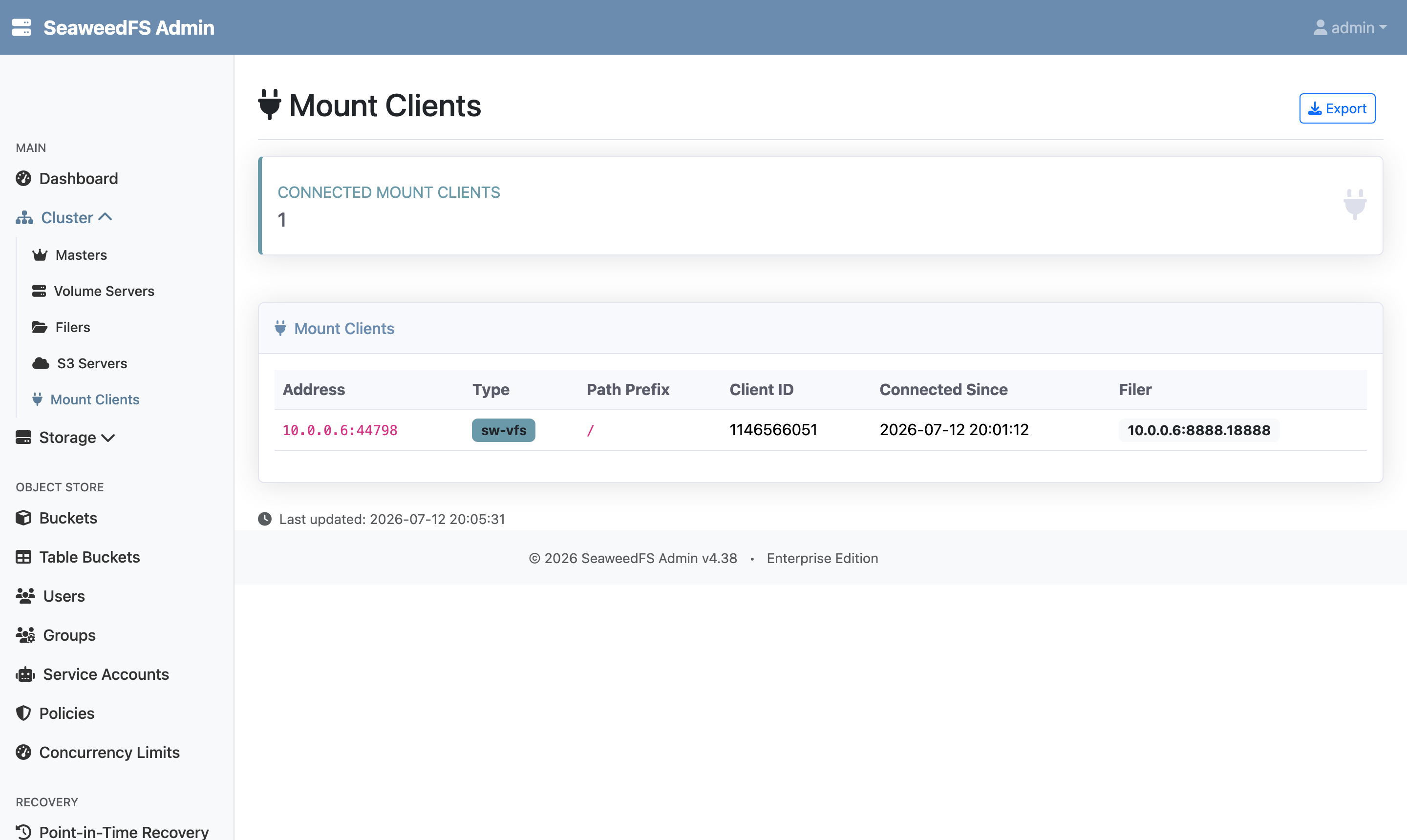
sw-vfs client attached to the filer.And the files we created through mount, rsync, SQLite, and git are just entries in the namespace, browsable like any others:
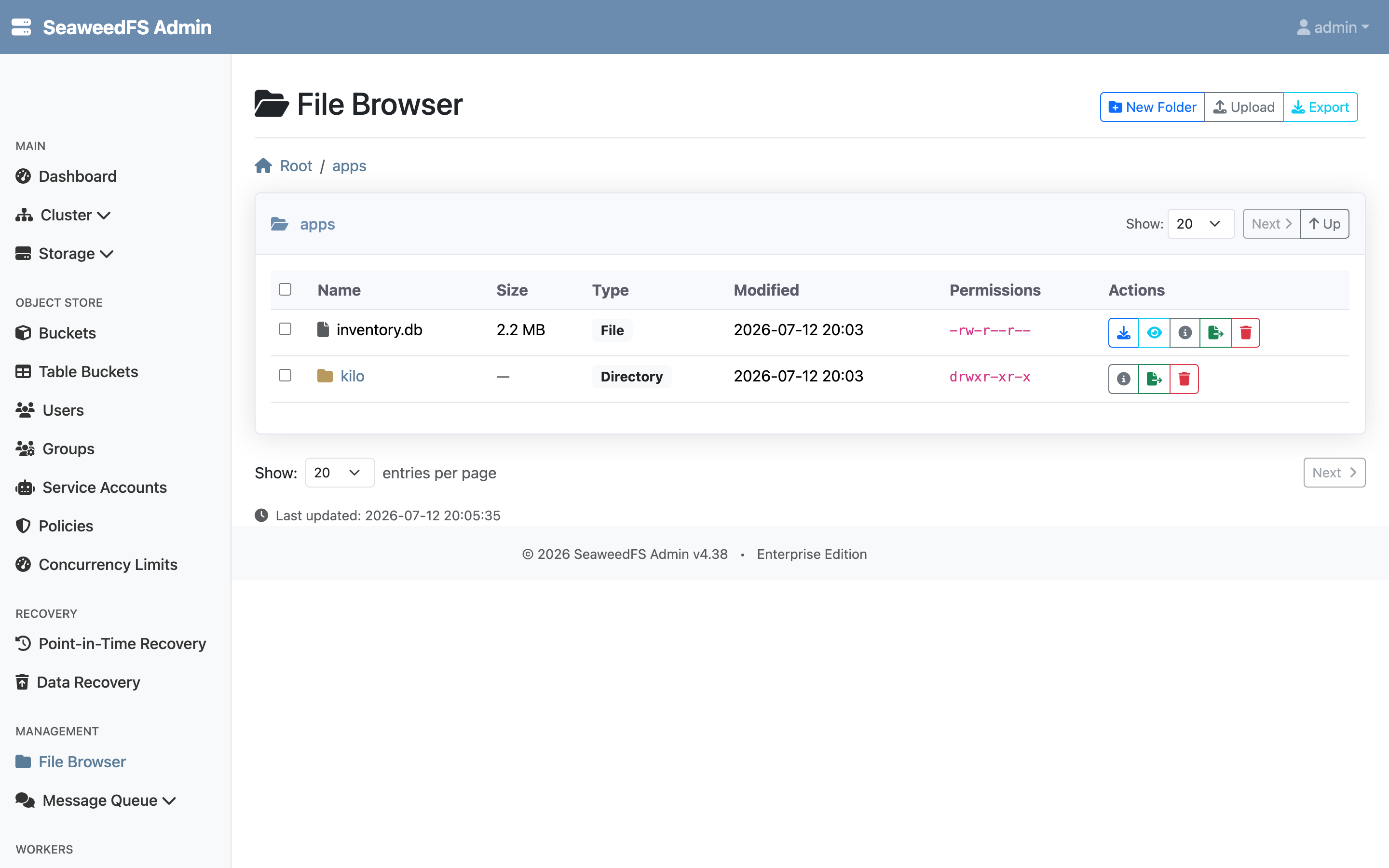
/apps: the SQLite database and the cloned repository, written through the mount.Step 8 — re-export it over NFS
A seaweedvfs mount can be re-exported with the standard kernel NFS server — no gateway, just /etc/exports. That lets machines without the kernel module (or a mixed fleet) reach the same namespace over NFSv4:
$ sudo apt-get install -y nfs-kernel-server

$ echo "/mnt/seaweed  127.0.0.1/32(rw,fsid=0,no_subtree_check,no_root_squash,sync)" | sudo tee /etc/exports
$ sudo exportfs -ra && sudo exportfs -v
/mnt/seaweed  	127.0.0.1/32(sync,wdelay,hide,no_subtree_check,fsid=0,sec=sys,rw,secure,no_root_squash,no_all_squash)
(fsid=0 makes the mount the NFSv4 root. And a classic NFS gotcha caught us on the first try: with the default root_squash, root’s writes arrive as nobody and got Permission denied — for this single-box demo we added no_root_squash; on a real fleet you’d keep the squash and make user-owned directories instead. We’re exporting to localhost only here; widen the CIDR for real clients.)
Mount it as an NFS client and use it:
$ sudo mkdir -p /mnt/seaweed-nfs && sudo mount -t nfs4 127.0.0.1:/ /mnt/seaweed-nfs
$ ls /mnt/seaweed-nfs
apps
backups
hello.txt
sample.bin

$ echo "hello from an NFS client" | sudo tee /mnt/seaweed-nfs/from-nfs.txt
hello from an NFS client
One write, three views — the NFS path, the kernel mount, and the filer API all agree instantly:
$ cat /mnt/seaweed/from-nfs.txt
hello from an NFS client
$ curl -s http://10.0.0.6:8888/from-nfs.txt
hello from an NFS client
This works safely because seaweed-vfs gives knfsd what it needs from an exported filesystem: file handles that keep resolving across renames (the daemon maintains a rename-forwarding index) and that go ESTALE rather than ever resolving to a different object. NFS re-export is currently experimental — see the docs for the exact guarantees and the multi-filer requirement (a shared filer store).
Step 9 — make it permanent
One /etc/fstab line survives reboots; the helper starts the daemon on demand:
10.0.0.6:18888 /mnt/seaweed seaweedvfs _netdev 0 0
Upgrades are the same one-liner as the install (re-run it any time; the daemon can restart under a live mount), and sudo umount /mnt/seaweed is the whole teardown.
Wrapping up
Twenty minutes on an empty box: one installer, one mount command, and SeaweedFS becomes a filesystem that SQLite, git, cc, rsync — and the kernel’s own NFS server — treat as local. The parts worth remembering:
- Nothing to configure before mounting — the filer is a mount-time argument, and each filer gets its own daemon.
- The client is small at rest, bounded under load — a ~61 KB module and a ~21 MB idle daemon that stays flat with file count; its I/O buffers (256 MiB chunk cache by default, plus glibc retention) are capped with
--chunk-cache-mbandMALLOC_ARENA_MAX=2. - Cached I/O is kernel-speed — repeat reads never cross into userspace, which is the difference you feel over FUSE.
- NFS re-export needs no gateway — the stock kernel server exports the mount like any local filesystem.
The Kernel Mount page covers requirements and quickstart, the internals reference explains the kernel↔daemon split and memory model, and the operations reference has fleet deployment, Secure Boot, and building from source. SeaweedFS Enterprise is free for development and testing under 25TB.